

Mobile applications have become a core part of how businesses operate in New York’s highly competitive digital economy. From fintech startups in Manhattan to retail brands in Brooklyn and enterprise firms across the city, mobile solutions are no longer optional, they are foundational.
A major decision that consistently shapes outcomes is in-house vs outsourced app development in New York. This choice influences not only the budget but also product quality, speed to market, team dynamics, and long-term scalability. In many cases, businesses also choose to work with a mobile app development company in New York to support planning, design, and development when internal resources are limited.
What makes this decision complex is that there is no universal answer. The right approach depends on business maturity, funding, internal technical expertise, and urgency. Often, the discussion is not just about cost, but also about control, risk, and long-term growth.
This guide takes a structured, experience-informed look at mobile app development in New York in 2026, breaking down processes, timelines, cost structures, and team models in a way that reflects real-world decision-making.
What is Custom Mobile App Development?
Custom mobile app development refers to designing and building applications specifically tailored to a business’s goals, workflows, and users. Unlike generic solutions, custom apps are not constrained by pre-defined templates or limited configurations.
When companies evaluate in-house vs outsourced app development in New York, custom development often becomes the center of discussion because it determines how much control the business retains over product evolution.
In practice, custom development is not just about writing code, it is about translating business strategy into a digital product that can scale.
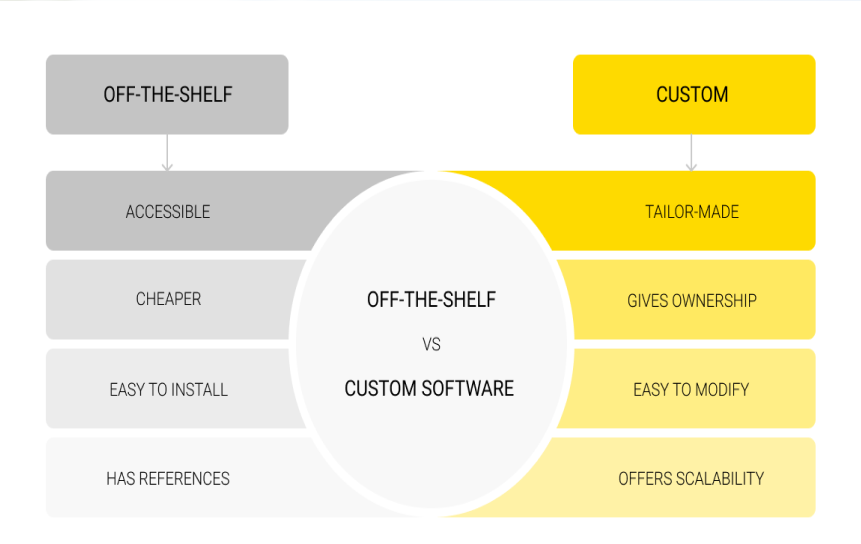
Custom Apps vs Off-the-Shelf Apps (Easy Breakdown)
1. Off-the-Shelf Apps
These are ready-made apps you can buy and use immediately.
Key points:
- Quick to set up
- Lower cost at the start
- Made for general use (many users)
- Limited customization
Downside:
- Hard to change or add special features later
- May not fully match your business needs
2. Custom Apps
These are apps built specially for your business from scratch.
Key points:
- Built based on your exact needs
- Full control over design and features
- Can integrate with other systems easily
Downside:
- Takes more time to build
- Higher initial cost
- Needs proper planning
3. Which One to Choose?
In in-house vs outsourced app development in New York, many startups start with off-the-shelf apps because they are fast and cheap. But they may switch later when their needs grow.
4. Simple Example
- A logistics company uses a basic tracking tool (off-the-shelf).
- Later, they need real-time route optimization but the tool can’t support it.
- A custom app could include this feature from the beginning.
Benefits of Custom Apps for Startups and Enterprises (Simple Breakdown)
1. Startups
Custom apps help startups stand out in competitive markets.
Key benefits:
- Create unique features instead of using common ones
- Build a strong and different brand identity
- Offer a better and more personalized user experience
- Stand out from competitors using similar tools
2. Enterprises
Large companies usually need more complex systems.
Key benefits:
- Connect easily with internal tools like CRM, ERP, and data systems
- Manage large amounts of data smoothly
- Improve workflow across departments
Important decision:
Enterprises must choose between:
- Building and managing an in-house team, or
- Hiring an outsourced development team in New York
3. Better Data Control
Custom apps also give stronger control over data.
Why it matters:
- Important for industries like healthcare and finance
- Helps meet legal and security requirements
- Reduces risk of data leaks or misuse
When to Choose Custom Development
Custom development becomes necessary when business logic is too complex for pre-built tools. Companies evaluating in-house vs outsourced app development New York often choose custom solutions when scalability, performance, or user experience cannot be compromised.
It is also the preferred approach when long-term product ownership is a priority, as custom apps evolve alongside the business rather than forcing businesses to adapt to software limitations.
Complete Mobile App Development Process in New York
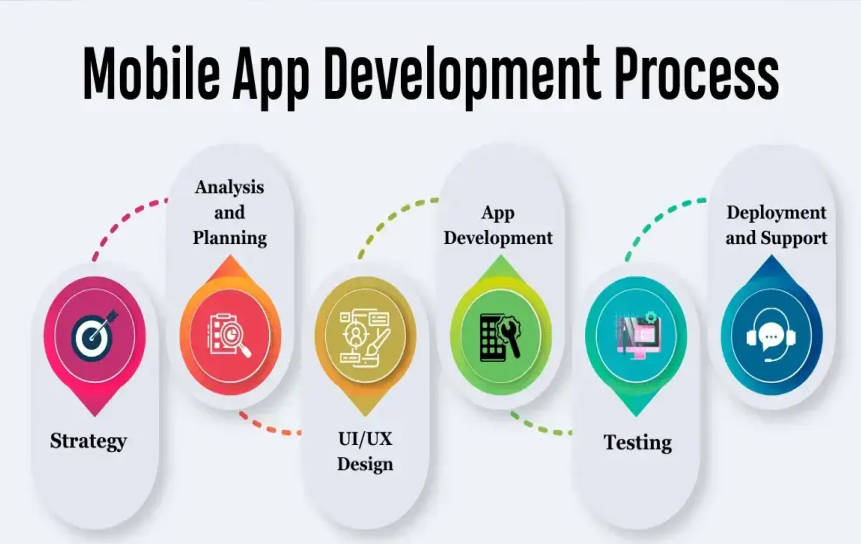
Understanding the development lifecycle provides clarity on why in-house vs outsourced app development New York decisions significantly impact project execution.
Each stage of development requires specialized skills, and how these roles are distributed, internally or externally, can shape both efficiency and cost.
Step 1: Idea Validation & Market Research
This is the foundation of the entire project. The goal is to confirm that the app idea is worth building.
What happens in this stage:
- Identifying the core problem the app solves
- Defining the target audience (who will use it)
- Studying competitors in the New York and global market
- Analyzing similar apps and their weaknesses
- Collecting user feedback through surveys or interviews
- Checking market demand and trends
- Estimating business potential (revenue, growth, usage)
Key output:
- Problem statement
- Target user profiles (personas)
- Market analysis report
- Initial feature ideas
Why it matters:
Many apps fail because they are built without validating demand first.
In-house vs outsourced perspective:
- Outsourced teams often use structured research frameworks and industry benchmarks
- In-house teams usually understand business goals and long-term strategy better
Step 2: Planning & Requirement Analysis
This step converts the idea into a clear technical and business roadmap.
What happens here:
- Defining app features in detail (feature breakdown)
- Prioritizing features (MVP vs future updates)
- Creating user journey flows (how users move inside the app)
- Selecting technology stack (frontend, backend, database)
- Defining system architecture (how everything connects)
- Estimating development timeline
- Budget planning and resource allocation
- Risk identification (technical + business risks)
Key output:
- Product requirement document (PRD)
- Technical architecture diagram
- Project roadmap
- MVP scope definition
Why it matters:
Poor planning often leads to:
- Budget overruns
- Missed deadlines
- Rebuilding features later
In-house vs outsourced perspective:
- Outsourcing teams bring experience from multiple industries
- In-house teams ensure alignment with internal systems and business rules
Step 3: UI/UX Design
This step focuses on how the app looks and how users interact with it.
UI (User Interface):
- Layout design of screens
- Colors, typography, branding
- Buttons, icons, and visual elements
UX (User Experience):
- Navigation flow
- Ease of use
- Reducing user effort
- Improving engagement and retention
What happens here:
- Wireframes (basic screen layouts)
- Interactive prototypes (clickable models)
- Final UI design mockups
- User testing for design feedback
- Design system creation (consistent styles)
Key output:
- Wireframes
- High-fidelity designs
- Clickable prototype
Important considerations:
- Complex animations increase development time
- Design decisions directly impact cost and performance
Step 4: Frontend Development
Frontend is everything the user sees and interacts with.
What happens here:
- Converting UI designs into code
- Building screens (login, dashboard, settings, etc.)
- Implementing navigation and transitions
- Connecting frontend to backend APIs
- Handling user interactions (buttons, forms, gestures)
- Ensuring responsiveness (different screen sizes)
Technologies used:
- Native apps: Swift (iOS), Kotlin (Android)
- Cross-platform: Flutter, React Native
Key output:
- Fully functional user interface
- Responsive and interactive app screens
In-house vs outsourced perspective:
- Outsourced developers often deliver faster due to specialization
- In-house teams may have deeper knowledge of internal systems but slower scaling
Step 5: Backend Development
Backend is the core system that powers the app.
What happens here:
- Setting up databases (user data, transactions, etc.)
- Building APIs (communication layer between frontend and backend)
- User authentication (login, signup, security)
- Server-side logic (business rules)
- Data processing and storage
- Cloud infrastructure setup
Technologies used:
- Node.js, Python, Java, .NET
- Databases: PostgreSQL, MySQL, MongoDB
- Cloud: AWS, Azure, Google Cloud
Key output:
- Secure backend system
- APIs for frontend communication
- Scalable database structure
Why it matters:
A weak backend leads to:
- App crashes under load
- Slow performance
- Security vulnerabilities
Step 6: Testing & Quality Assurance (QA)
This ensures the app works correctly before launch.
Types of testing:
- Functional testing (do features work?)
- UI testing (does design behave correctly?)
- Performance testing (speed, load handling)
- Security testing (data protection, vulnerabilities)
- Compatibility testing (different devices and OS versions)
- Regression testing (new updates don’t break old features)
What happens here:
- Finding bugs and reporting them
- Fixing issues across development stages
- Re-testing after fixes
- Automation testing setup (for large apps)
Key output:
- Bug-free or stable application
- Test reports and quality reports
Important insight:
Best teams integrate QA continuously, not just at the end.
Step 7: Deployment & Launch
This is the process of releasing the app to users.
What happens here:
- Preparing production environment
- Deploying backend servers
- Publishing app to:
- Apple App Store
- Google Play Store
- Configuring analytics tools
- Final security checks
- App store optimization (ASO)
Risks:
- App store rejection due to policy issues
- Server misconfiguration
- Last-minute bugs
Key output:
- Live mobile application
- Accessible to real users
Step 8: Maintenance & Updates
This is the long-term phase after launch.
What happens here:
- Fixing bugs reported by users
- Adding new features
- Improving performance
- Updating security patches
- Adapting to new OS updates (iOS/Android)
- Monitoring app analytics
- Scaling infrastructure as users grow
Ongoing activities:
- Customer support integration
- Crash monitoring tools (like Firebase, Sentry)
- Regular performance optimization
Why it matters:
Maintenance often becomes the largest long-term cost, especially when comparing in-house vs outsourced app development in New York.
Mobile App Development Timeline in New York
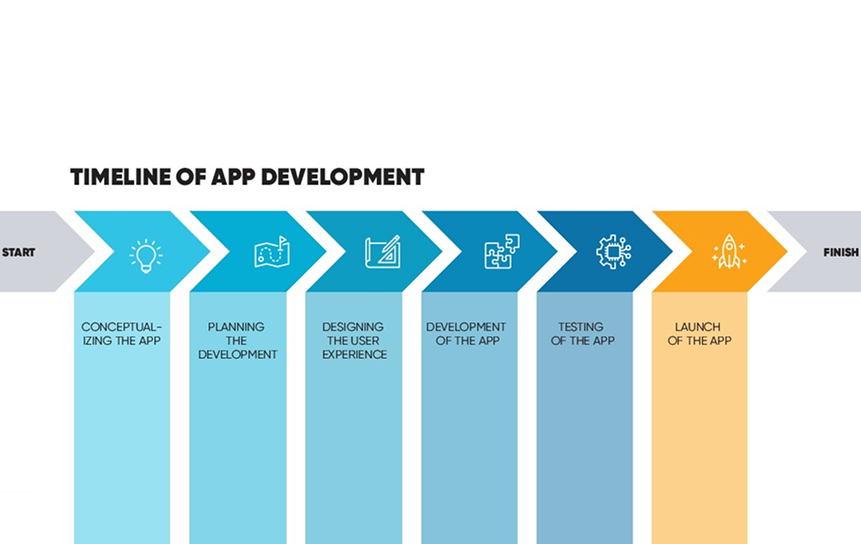
Timelines vary widely depending on complexity and team structure. One of the key differences in in-house vs outsourced app development New York is how resources are allocated to speed up delivery.
1. Simple Apps (4–8 Weeks)
What are simple apps?
These are basic applications with limited features, often built for MVPs (Minimum Viable Products), prototypes, or internal business use.
Typical features:
- Basic user interface (UI screens)
- User login and registration (authentication)
- Simple backend setup
- Few core functions (1–3 main features)
- No complex integrations
Examples:
- Basic to-do apps
- Simple booking apps
- Internal staff tools
- Basic informational apps
Development breakdown:
- Week 1: Idea validation + planning
- Week 2–3: UI/UX design
- Week 3–6: Frontend + backend development
- Week 6–8: Testing and deployment
Key point:
These apps are usually built quickly to test an idea in the market.
2. Medium Apps (8–16 Weeks)
What are medium apps?
These apps have more features and require multiple systems to work together.
Typical features:
- User dashboards
- API integrations (third-party services)
- Payment systems (Stripe, PayPal, etc.)
- Notifications (email, push notifications)
- More advanced backend logic
Examples:
- E-commerce apps
- Food delivery apps
- Fitness tracking apps
- Booking and reservation systems
Development breakdown:
- Weeks 1–3: Research, planning, requirement analysis
- Weeks 3–6: UI/UX design and prototyping
- Weeks 6–12: Frontend and backend development
- Weeks 12–16: Testing, optimization, and deployment
Key challenge:
Coordination becomes more important because multiple features and systems must work together smoothly.
3. Complex Apps (4–8+ Months)
What are complex apps?
These are large-scale applications with advanced functionality, high performance needs, and strong scalability requirements.
Typical features:
- Real-time features (chat, live tracking, streaming)
- Large-scale databases and user systems
- Advanced backend architecture
- AI or machine learning integration
- Multi-role systems (admin, users, vendors, etc.)
- High security and compliance requirements
Examples:
- Ride-sharing apps (like Uber-style platforms)
- Banking or fintech apps
- Healthcare platforms
- Enterprise-level SaaS products
Development breakdown:
- Month 1–2: Deep research, architecture planning, system design
- Month 2–3: UI/UX design + prototyping
- Month 3–6: Full-scale frontend + backend development
- Month 6–8+: Testing, scaling, optimization, and deployment
Key challenge:
These projects require strong coordination between multiple teams, and delays can easily happen without proper planning.
In-house vs outsourced perspective:
Many companies use a hybrid model (in-house + outsourced teams) to handle workload, speed up development, and manage specialized tasks efficiently
Custom Mobile App Development Cost in New York 2026
Cost is one of the most influential factors in in-house vs outsourced app development New York decisions. NYC is known for high labor costs, making financial planning critical.
1. Basic App Cost ($25,000 – $60,000)
What is a basic app?
These are simple apps with limited features, usually built for MVPs or early-stage business ideas.
What’s included:
- Simple user interface (UI)
- Basic login/registration system
- Few core features (1–3 functions)
- Minimal backend development
- No complex integrations
Examples:
- Simple task manager apps
- Basic booking or appointment apps
- Informational apps (company/service apps)
Cost drivers:
- Small development team
- Short development timeline
- Limited design and backend work
2. Medium Complexity App Cost ($60,000 – $150,000)
What is a medium app?
These apps have more features and require integration with other systems.
What’s included:
- User dashboards and profiles
- API integrations (third-party services)
- Payment gateways (Stripe, PayPal, etc.)
- Push notifications and alerts
- More advanced UI/UX design
- Scalable backend system
Examples:
- E-commerce apps
- Food delivery platforms
- Fitness or health tracking apps
- Service booking apps
Cost drivers:
- Larger development teams
- More complex backend logic
- Longer testing and QA cycles
- Higher design effort
3. Advanced / Enterprise App Cost ($150,000 – $500,000+)
What is an enterprise app?
These are large-scale systems built for high performance, security, and scalability.
What’s included:
- Real-time features (chat, live tracking, streaming)
- Complex system architecture
- Advanced security and data protection
- Multiple user roles (admin, user, vendor, etc.)
- Large database systems
- Cloud infrastructure setup and scaling
Examples:
- Fintech or banking apps
- Healthcare management systems
- Large SaaS platforms
- Ride-sharing or logistics platforms
Cost drivers:
- Senior-level engineers and architects
- High security and compliance requirements
- Continuous testing and optimization
- Long development timelines
Important Insight: Why Costs Vary in New York
Several factors make app development more expensive in NYC:
- High developer salaries
- Cost of maintaining in-house teams
- Premium for specialized expertise
- Complex project requirements in enterprise apps
In-house vs Outsourced App Development Impact
In in-house vs outsourced app development in New York, cost differences come from:
In-house teams:
- Higher fixed costs (salaries, benefits, office space)
- More control over long-term development
- Better alignment with company culture
Outsourced teams:
- Flexible pricing models
- Lower overhead costs
- Faster access to specialized skills
- Easier to scale up or down
Detailed Cost Breakdown of App Development
Breaking down app development costs helps businesses clearly understand where their money is going. This is especially important when deciding between in-house vs outsourced app development in New York, since each cost area can change depending on the team structure and project approach.
Below is a simple breakdown of how the total budget is usually distributed across different stages of development.
1. Planning & Research Cost
This is the starting phase where the idea is shaped into a clear plan.
What it includes:
- Discovery workshops
- Market and competitor research
- User research and interviews
- Feature planning and prioritization
- Technical documentation
Why it matters:
Good planning reduces the risk of building the wrong product or overspending later in development.
2. UI/UX Design Cost
This stage focuses on how the app looks and feels for users.
What it includes:
- Wireframes and user flow design
- Visual UI design (screens, layouts, branding)
- Interactive prototypes
- Design revisions and user feedback
What affects cost:
- Number of screens
- Level of customization
- Complexity of animations and interactions
3. Frontend Development Cost
Frontend is everything users see and interact with inside the app.
What it includes:
- Building app screens from designs
- Implementing navigation and interactions
- Connecting UI with backend APIs
- Ensuring responsiveness across devices
What affects cost:
- Platform choice (iOS, Android, or both)
- Use of native vs cross-platform frameworks
- UI complexity and animations
4. Backend Development Cost
Backend is the core system that powers the app behind the scenes.
What it includes:
- Database setup and management
- API development
- User authentication and security systems
- Business logic implementation
- Cloud infrastructure setup
Why it matters:
Backend development often takes the largest share of the budget because it defines how scalable and secure the app will be.
5. Testing & QA Cost
This stage ensures the app works correctly before launch.
What it includes:
- Functional testing (feature checks)
- Performance testing (speed and load handling)
- Security testing
- Bug fixing and regression testing
- Device and OS compatibility testing
Why it matters:
Strong QA reduces post-launch issues and improves user experience.
6. Deployment & Maintenance Cost
This is the final and ongoing stage after the app goes live.
What it includes:
- App store deployment (iOS & Android)
- Server setup and production configuration
- Monitoring tools and analytics setup
- Bug fixes after launch
- Regular updates and feature improvements
Why it matters:
Maintenance is a long-term cost that many businesses underestimate, but it is essential for keeping the app stable and updated.
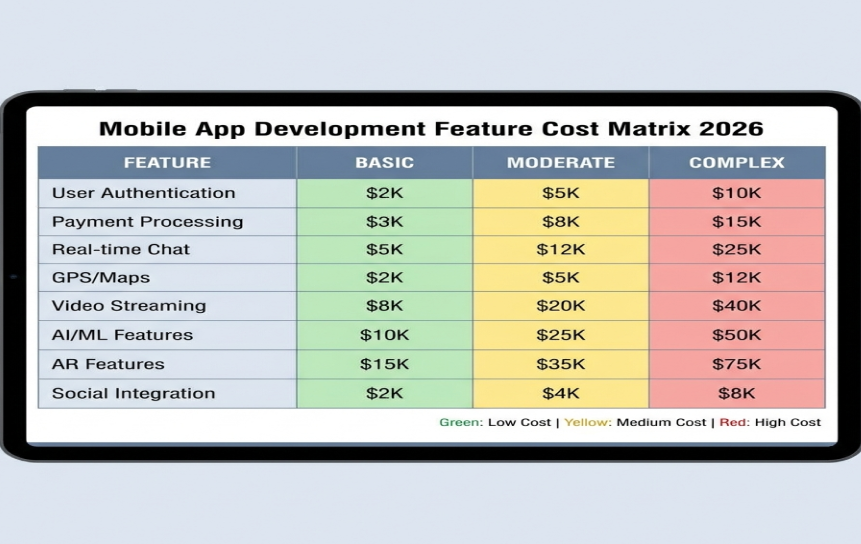
Mobile App Cost Per Feature in New York 2026
Understanding cost at a feature level helps businesses clearly see how budget is distributed across an app. This approach is especially useful when comparing in-house vs outsourced app development in New York, because each feature may require different skill sets, time, and infrastructure.
User Authentication & Login
This is the system that allows users to securely access the app.
What it includes:
- Email and password login
- OTP (one-time password) verification
- Social login (Google, Apple, Facebook)
- Password reset and account recovery
- Basic security and encryption setup
Cost insight:
Costs increase if advanced security measures or multi-factor authentication are required.
Payment Integration
This feature enables users to make secure transactions inside the app.
What it includes:
- Integration with payment gateways (Stripe, PayPal, etc.)
- Secure transaction processing
- Subscription or one-time payment models
- Refund and billing logic
- Compliance with financial security standards
Cost insight:
This is one of the more sensitive features due to strict security and compliance requirements.
Real-Time Chat Feature
This allows users to communicate instantly within the app.
What it includes:
- One-to-one messaging
- Group chats (if needed)
- Read receipts and typing indicators
- Real-time message delivery
- Media sharing (images, files, etc.)
Cost insight:
More expensive than standard features because it requires real-time infrastructure like WebSockets or similar systems.
Push Notifications
This feature helps keep users engaged with the app.
What it includes:
- User notifications (alerts, updates, reminders)
- Targeted messaging based on user behavior
- Scheduling notifications
- Campaign-based engagement tools
Cost insight:
Cost depends on personalization level and integration with analytics or marketing tools.
Admin Dashboard
This is the control panel used by internal teams to manage the app.
What it includes:
- User management system
- Content or data management
- Analytics and reporting tools
- Role-based access control
- System monitoring tools
Cost insight:
Complex dashboards with advanced analytics or multiple roles increase development effort significantly.
API Integrations
This feature connects the app with external services and systems.
What it includes:
- Third-party service integration (maps, payments, CRM, etc.)
- Data syncing between systems
- Authentication with external platforms
- Error handling and fallback systems
Cost insight:
API integrations often introduce hidden complexity, especially when multiple systems need to work together smoothly.
Key Factors That Affect Mobile App Development Cost (New York, 2026)
Understanding cost drivers helps businesses make better decisions when comparing in-house vs outsourced app development in New York. The tables below break down the main factors and their impact.
App Complexity
| Factor | Details | Cost Impact |
| Number of features | More features mean more development work | Increases cost significantly |
| Backend logic | Complex workflows and data processing | Requires more time and expertise |
| Real-time features | Chat, tracking, live updates | Adds high technical complexity |
| Scalability needs | Ability to handle many users | Increases architecture cost |
Platform (iOS, Android, Cross-Platform)
| Option | Details | Cost Impact |
| Native iOS | Built using Swift for Apple devices | Higher cost (separate build needed) |
| Native Android | Built using Kotlin for Android devices | Higher cost (separate build needed) |
| Cross-platform | Single codebase (Flutter/React Native) | Lower cost compared to native |
Design Requirements (UI/UX)
| Design Element | Details | Cost Impact |
| Basic UI | Simple layouts and standard screens | Lower cost |
| Custom UI | Unique layouts and branding | Medium cost increase |
| Advanced animations | Motion design and transitions | High cost increase |
| Multiple revisions | Frequent design changes | Increases time and budget |
Developer Rates in New York
| Factor | Details | Cost Impact |
| Senior developers | Highly experienced engineers | High hourly rates |
| Demand in NYC | High competition for talent | Increases overall pricing |
| Team size | Larger teams for faster delivery | Higher total cost |
Project Timeline
| Timeline Factor | Details | Cost Impact |
| Normal timeline | Standard development pace | Balanced cost |
| Tight deadline | Faster delivery required | Higher cost due to scaling resources |
| Parallel development | Multiple teams working at once | Increases overall budget |
| Extended timeline | Long-term projects | Higher cumulative cost |
New York Developer Rates 2026
Developer pricing is one of the biggest cost drivers in mobile projects and plays a key role in in-house vs outsourced app development in New York decisions. Rates vary widely depending on experience level, working model, and location.
Freelancer Rates
| Category | Hourly Rate | Details | When Used |
| Junior freelancers | $50 – $80/hr | Basic app tasks, limited experience | Small features, bug fixes |
| Mid-level freelancers | $80 – $120/hr | Solid experience with real projects | MVP development, UI work |
| Senior freelancers | $120 – $150/hr | Advanced architecture, complex systems | High-level backend/frontend work |
Key points:
- Lower cost compared to agencies
- Flexible hiring (part-time or full-time)
- Less structured project management
- Quality can vary depending on individual skill
Agency Pricing
| Category | Hourly Rate | Details | When Used |
| Small agencies | $100 – $150/hr | Small teams with basic structure | Startup MVPs, simple apps |
| Mid-size agencies | $150 – $200/hr | Dedicated teams + project managers | Full app development projects |
| Large agencies | $200 – $250+/hr | Enterprise-level delivery teams | Complex, scalable systems |
Key points:
- Includes designers, developers, QA, and project managers
- More structured workflow and accountability
- Faster delivery due to team coordination
- Higher cost due to overhead and management layers
NYC vs Other Cities Comparison
| Location | Hourly Rate Range | Key Characteristics |
| New York City | $100 – $250+/hr | High demand, premium talent, expensive market |
| Other US cities | $70 – $180/hr | Slightly lower cost, still high quality talent |
| Eastern Europe | $40 – $100/hr | Strong technical talent, lower operational cost |
| South Asia (e.g., Pakistan, India) | $25 – $80/hr | Cost-effective, large talent pool, outsourcing hub |
| Southeast Asia | $30 – $90/hr | Growing tech ecosystem, competitive pricing |
Key insight:
NYC has some of the highest developer rates globally due to:
- High cost of living
- Strong demand for skilled engineers
- Enterprise-level clients and startups competing for talent
This is why many companies consider outsourced development to balance cost while maintaining quality.
Hidden Costs of Custom App Development
Hidden costs are often overlooked when businesses compare in-house vs outsourced app development in New York, but they can significantly affect the total long-term budget. These costs usually appear after development starts or even after the app is launched.
Maintenance & Updates
After an app is launched, it cannot be left unchanged. Regular maintenance is required to keep it stable and secure.
This includes:
- Fixing bugs that appear after user feedback
- Updating features over time
- Improving performance and speed
- Ensuring compatibility with new iOS and Android versions
- Security patches to protect user data
Without ongoing maintenance, even a well-built app can become outdated or unstable over time.
Third-Party Integrations
Most modern apps rely on external services to function properly.
Common integrations include:
- Payment gateways (Stripe, PayPal, etc.)
- Maps and location services
- SMS, email, and OTP services
- Analytics and tracking tools
- CRM and marketing platforms
Many of these services are subscription-based, meaning businesses pay recurring monthly or usage-based fees. These costs grow as the user base increases.
Cloud Hosting & Infrastructure
Apps need servers, databases, and cloud systems to run smoothly.
This includes:
- Cloud hosting (AWS, Azure, Google Cloud)
- Database storage and management
- Load balancing for high traffic
- Data backup and recovery systems
- Scaling infrastructure as users grow
As the app gains more users, infrastructure costs increase because more computing power and storage are required.
App Store & Deployment Costs
Publishing and maintaining apps on platforms also involves additional expenses.
These include:
- Apple App Store developer account fees
- Google Play Store registration fees
- App review and compliance requirements
- Updates required to meet platform guidelines
- Potential re-submission costs if apps are rejected
Even though these fees may seem small individually, they add up over time, especially for long-term products.
How to Reduce Custom App Development Cost
Reducing development cost is a major priority for businesses when comparing in-house vs outsourced app development in New York. Smart planning and the right technical choices can significantly lower both initial and long-term expenses without compromising quality.
Build an MVP First
One of the most effective ways to control cost is to start with an MVP (Minimum Viable Product).
This means:
- Building only the core features needed to solve the main problem
- Launching quickly to test real user demand
- Collecting feedback before investing in advanced features
Use Cross-Platform Development
Choosing the right development approach can greatly reduce costs.
Cross-platform development means:
- One codebase for both iOS and Android
- Faster development process
- Reduced need for separate teams
Outsource Smartly
Many businesses reduce costs by carefully choosing when and what to outsource.
This approach allows companies to:
- Access skilled developers without hiring full-time staff
- Scale teams based on project needs
- Reduce overhead costs like salaries and office expenses
Focus on Core Features
One common mistake in app development is adding too many features too early.
To control cost:
- Prioritize features that solve the main user problem
- Avoid unnecessary add-ons in the first version
- Delay advanced features until after user validation
Custom App vs Pre-Built Solutions Cost Comparison
Understanding the differences between custom and pre-built solutions is important when evaluating in-house vs outsourced app development in New York. The right choice depends on budget, flexibility needs, and long-term business goals.
Cost Difference
| Option | Description | Cost Impact |
| Custom Apps | Built from scratch based on business needs | Higher upfront cost but tailored to requirements |
| Pre-Built Solutions | Ready-made software used with minimal changes | Lower initial cost but limited customization |
Flexibility & Scalability
| Option | Description | Impact on Growth |
| Custom Apps | Designed specifically for your workflows and systems | Scales easily with business expansion and new features |
| Pre-Built Solutions | Fixed structure with limited customization options | May struggle to support complex or growing needs |
Long-Term ROI
| Option | Description | ROI Outcome |
| Custom Apps | Higher investment at the start but fully owned solution | Strong long-term ROI due to flexibility and efficiency |
| Pre-Built Solutions | Subscription-based or license-based tools | Lower ROI over time due to recurring costs and limitations |
Final Thoughts
Every business should first be clear about its goals, available budget, and long-term plans before choosing how to build an app. The decision is not just about saving money, but about what the business needs now and in the future.
In many cases, in-house vs outsourced app development in New York is not an either-or choice. A mix of both is common, where the company handles planning and direction internally while outside teams handle parts of the development work.
It’s also important to plan the budget properly from the start. Costs like maintenance, updates, scaling, hosting, and third-party tools should be included early, not treated as afterthoughts.
In the end, the best choice depends on what fits the business, not just the development model. Whether the work is done by local NYC developers or teams elsewhere, what matters most is building a product that works well and supports business goals.
Book a consultation with our mobile app developer in New York to streamline your workflows and enhance internal process control today.
FAQs
Answering the most common questions related to in-house vs outsourced app development in New York.
-
Is outsourcing app development cheaper than in-house in NYC?
In most cases, outsourcing reduces upfront costs because it avoids salaries, benefits, and long-term overhead associated with in-house teams in New York.
-
How much does in-house app development cost in New York?
The in-house app development cost New York can exceed $300,000 annually for a small team, depending on seniority and team size.
-
What are the risks of outsourcing app development?
Risks include communication gaps, inconsistent quality, and dependency on external teams. However, structured management reduces these risks significantly.
-
Which option is better for startups?
Startups often prefer outsourcing due to lower initial costs and faster execution, especially when validating product-market fit.
-
Can I combine in-house and outsourced teams?
Yes, hybrid models are increasingly common and often provide a balanced approach between control and efficiency.


