
What Are Salesforce Validation Rules?
Definition of Validation Rules
Salesforce validation rules are logical conditions inside Salesforce that ensure only clean, accurate, and complete data is saved into the system. They act as a protective layer between users and the database, stopping incorrect entries before they affect reporting, automation, or customer workflows.
Instead of allowing any kind of input, these rules evaluate data using formulas. If the condition evaluates to TRUE, the system blocks the record and displays a custom error message. If it evaluates to FALSE, the record is saved successfully.
In real business environments, validation rules are widely used to maintain structured CRM behavior. For example, a sales rep cannot close an opportunity without a close date, or a support agent cannot log a case without selecting a priority. This ensures consistent Salesforce data integrity across the organization.
Purpose of Data Validation
The core purpose of Salesforce validation rules is to enforce business logic directly inside the CRM system. Instead of relying on manual supervision, organizations embed their rules into the platform itself, often as part of broader Salesforce Managed Support Solutions that ensure ongoing system governance and optimization.
This helps businesses achieve better CRM data quality by reducing human errors, missing fields, and inconsistent formatting. When users are guided by rules, data becomes more reliable and easier to analyze.
Below is a simple breakdown of key purposes:
| Purpose | Description | Example |
| Prevent errors | Blocks incorrect data entry | Prevent empty email fields |
| Enforce rules | Applies business logic | Discount limits for sales reps |
| Improve consistency | Standardized data format | Uniform phone number format |
| Support reporting | Ensures accurate analytics | Correct revenue tracking |
In practice, organizations use validation rules not just for control but also for improving operational clarity and efficiency.
How Validation Rules Work
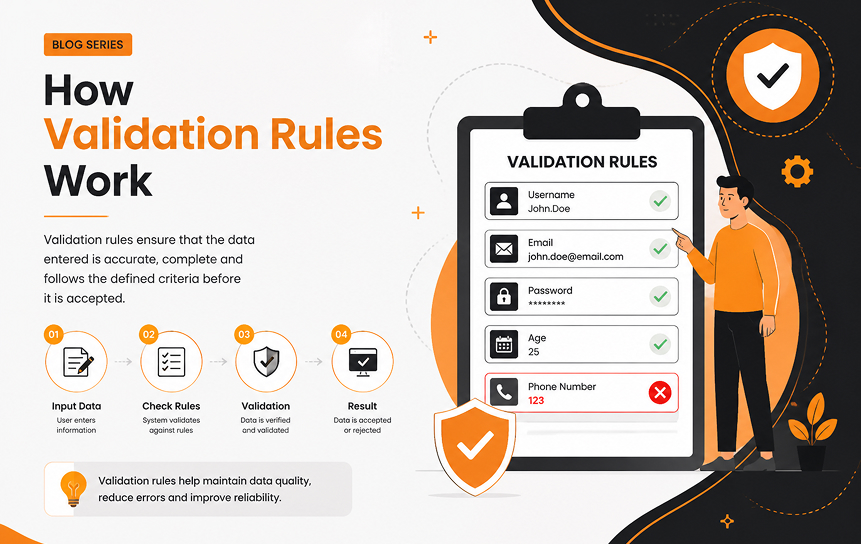
Salesforce validation rules work using logical formulas that evaluate record data before saving. These formulas can include functions, operators, and conditions that reflect real business requirements.
When a user attempts to save a record in Salesforce Lightning, the system checks the validation rule. If the rule condition is met, the system stops the save and displays an error message.
A simplified flow looks like this:
- User enters data into a record
- System evaluates validation formula
- Condition returns TRUE or FALSE
- TRUE = error displayed, record blocked
- FALSE = record saved successfully
For example:
- If “Stage = Closed Won” AND “Amount = 0” → system blocks save
- If “Email field does not contain @” → system shows error
This mechanism ensures Salesforce record validation happens in real time, preventing bad data from entering the system.
Relationship Between Validation and Data Quality
There is a direct connection between Salesforce data validation and overall CRM performance. When validation rules are well-designed, they significantly improve CRM accuracy controls and reduce long-term data cleanup efforts.
Poor data quality leads to:
- Inaccurate forecasting
- Broken automation workflows
- Duplicate customer records
- Low trust in dashboards
On the other hand, strong validation ensures:
- Reliable reporting
- Clean segmentation
- Accurate customer insights
- Better decision-making
In simple terms, validation rules act as the foundation of CRM data governance, ensuring that every record entering the system follows predefined standards.
Importance of Business Rule Enforcement
Business rules define how an organization operates, and Salesforce validation rules ensure those rules are enforced consistently across all users.
Instead of relying on training or manual monitoring, companies embed their rules directly into the system. This reduces dependency on human discipline and increases compliance accuracy.
For example, a company may enforce:
- No opportunity can exceed $50,000 without manager approval
- All leads must include a valid email and phone number
- Cases must always include a priority level
These rules strengthen data governance in Salesforce by ensuring structured behavior across departments. They also help maintain operational discipline and reduce policy violations.
Why Data Accuracy Matters in Salesforce
Data accuracy is the backbone of any CRM system. Without it, even the most advanced tools become unreliable. Salesforce validation rules ensure that every piece of data entering the system is complete, structured, and meaningful.
When organizations use Salesforce Lightning effectively, validation rules become essential in maintaining long-term Salesforce data integrity and operational efficiency.
Impact on Reporting
Reporting is only as good as the data behind it. If records are incomplete or inconsistent, dashboards become misleading and decisions become risky.
With proper Salesforce validation rules, reporting accuracy improves significantly because:
- Revenue data remains consistent
- Sales pipeline reflects real opportunities
- Forecasting models become more reliable
For example, if every opportunity must have a valid amount and close date, then financial projections become far more trustworthy. This directly improves CRM data quality and executive decision-making.
Impact on Customer Experience
Customer experience depends heavily on how well data is managed inside the CRM. When records are incomplete or inaccurate, customers often face delays, repeated questions, or incorrect communication.
Validation rules help prevent these issues by ensuring:
- Contact details are always complete
- Customer history is properly recorded
- Support cases include required information
For example:
- A customer calling support does not need to repeat information
- Sales teams can see full interaction history
- Marketing emails are sent to correct addresses
This improves both satisfaction and trust in the organization.
Operational Efficiency Benefits
Operational efficiency improves when teams no longer waste time fixing bad data. Salesforce validation rules reduce manual corrections and improve workflow automation.
Benefits include:
- Faster data entry processes
- Reduced error correction workload
- Better automation accuracy
- Improved team productivity
For example:
- Lead assignment rules work correctly because all required fields are present
- Workflow automation triggers without failure
- Reports generate without missing values
This directly contributes to improved CRM accuracy controls and smoother business operations.
Compliance Considerations
Many industries require strict regulatory compliance. Salesforce validation rules help enforce these requirements automatically, reducing risk and ensuring audit readiness.
Examples include:
- GDPR consent fields must be checked before saving records
- Financial records must include mandatory audit fields
- Healthcare records require proper documentation
These rules strengthen data governance in Salesforce and ensure organizations meet legal and regulatory expectations without manual intervention.
Decision-Making Reliability
Decision-making depends entirely on data quality. When CRM data is clean, leaders can confidently plan strategies, forecast sales, and allocate resources.
With proper Salesforce data validation, organizations benefit from:
- Accurate forecasting
- Reliable trend analysis
- Better performance tracking
- Stronger strategic planning
Without validation rules, decisions are often based on incomplete or misleading data, which can negatively impact business growth.
Common Types of Salesforce Validation Rules
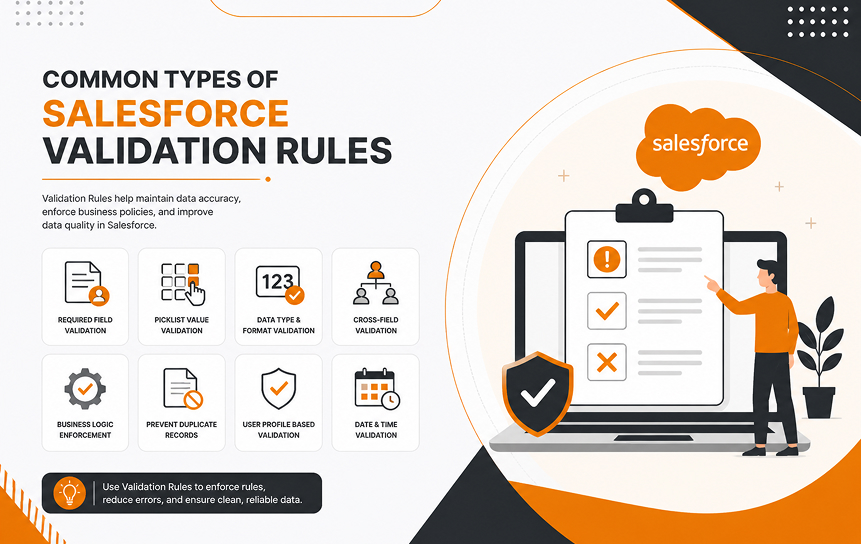
Different validation rules serve different business needs. In Salesforce validation rules, each type focuses on a specific aspect of data control, from required fields to complex business logic.
Required Field Validation
This type ensures that essential fields are never left blank. It is one of the most commonly used forms of Salesforce record validation.
| Field Type | Requirement | Example |
| Must be filled | Lead email required | |
| Account Name | Cannot be empty | Customer name mandatory |
| Case Description | Required | Support issue details |
These rules ensure that no critical data is missing at the point of entry.
Conditional Validation Rules
Conditional rules apply logic based on specific field values. They are widely used in dynamic business environments.
For example:
- If Lead Source = Web → Email is required
- If Opportunity Stage = Negotiation → Discount must be filled
- If Case Type = Technical → Product field becomes mandatory
These rules ensure context-aware Salesforce data validation.
Format-Based Validation
Format-based rules ensure data follows a consistent structure, which is essential for system integration and reporting.
Examples include:
- Email must include “@”
- Phone number must follow country format
- Postal codes must match regional structure
This improves CRM data quality and reduces integration errors.
Cross-Field Validation Logic
These rules compare multiple fields to ensure logical consistency across records.
Examples:
- Close Date cannot be earlier than Created Date
- Discount cannot exceed total opportunity value
- End Date must always be after Start Date
This ensures Salesforce data integrity across related fields.
Business Process Validation Rules
These rules enforce organizational workflows and approval processes.
Examples:
- High-value deals require manager approval
- Certain stages require documentation uploads
- Only specific roles can modify sensitive fields
These rules strengthen CRM governance and ensure controlled business processes.
How Validation Rules Improve CRM Governance
Strong CRM systems depend on governance, structure, and consistency. Salesforce validation rules play a major role in building strong governance frameworks inside organizations.
Standardizing Data Entry
Standardization ensures all users enter data in a consistent format. This improves system-wide usability and reporting accuracy.
For example:
- All phone numbers follow the same format
- Account names follow naming conventions
- Opportunity stages are standardized
This directly strengthens data governance in Salesforce.
Reducing Duplicate Information
Duplicate data is one of the biggest challenges in CRM systems. Validation rules help reduce duplication by enforcing uniqueness and structured entry.
Examples:
- Prevent duplicate email addresses
- Block duplicate account names in the same region
- Enforce unique customer identifiers
This improves CRM data quality and system reliability.
Enforcing Business Policies
Validation rules allow organizations to embed business policies directly into the CRM system.
Examples include:
- Minimum deal size enforcement
- Role-based discount limits
- Mandatory approval workflows
This ensures consistent execution of organizational rules.
Supporting Regulatory Compliance
Compliance requirements are increasingly strict across industries. Validation rules help enforce compliance automatically.
Examples:
- Required consent checkboxes
- Mandatory audit fields
- Data retention rules
This ensures organizations remain compliant without manual monitoring.
Improving Data Consistency
Consistent data improves integration across systems such as ERP and marketing platforms.
Benefits include:
- Better system synchronization
- Improved reporting accuracy
- Reduced integration errors
This strengthens overall CRM ecosystem performance.
Common Validation Rule Use Cases
Salesforce validation rules are applied across multiple departments, each with different requirements and workflows.
Lead Management Validation
Lead management requires strict control over incoming data.
Examples:
- Email must be valid
- Industry must be selected
- Phone number must be provided
This improves lead quality and conversion rates.
Opportunity Data Controls
Sales teams rely heavily on structured opportunity data.
Examples:
- Close dates must be in the future
- Revenue cannot be negative
- Stage progression must follow order
This ensures accurate forecasting.
Customer Record Accuracy
Customer records must always remain complete and reliable.
Examples:
- Required contact details
- Valid email format
- Accurate billing address
This improves customer communication.
Service Case Management
Support teams depend on structured case data.
Examples:
- Priority must be selected
- Case description required
- Product must be linked
This improves resolution speed.
Industry-Specific Data Requirements
Different industries require specialized validation logic.
Examples:
- Healthcare: patient consent required
- Finance: audit fields mandatory
- Retail: SKU validation enforced
This ensures industry compliance.
Best Practices for Salesforce Validation Rules
Effective implementation of Salesforce validation rules requires planning, clarity, and continuous improvement.
Keep rules simple and focused on one logic at a time. Avoid combining multiple business conditions into a single complex formula.
Align every rule with business objectives such as improving CRM accuracy controls, reducing errors, or supporting compliance.
Always test rules thoroughly in sandbox environments before deployment in Salesforce Lightning.
Avoid over-restricting users, as too many rules can reduce productivity and cause frustration.
Finally, document every rule clearly so future administrators can understand and maintain them easily.
Common Mistakes to Avoid
Poorly designed Salesforce validation rules can create more problems than they solve.
Overcomplicated formulas often lead to confusion and maintenance issues. Conflicting rules may block legitimate data entry and disrupt workflows.
Poor user communication can result in repeated errors and frustration. Lack of governance structure leads to inconsistent validation logic across teams.
Ignoring maintenance is another major issue, as business requirements evolve and rules must adapt accordingly.
Future of Data Quality Management in Salesforce
The future of CRM systems is becoming more intelligent and automated. Salesforce validation rules will evolve alongside AI-driven systems.
AI-assisted validation will automatically detect anomalies and suggest corrections in real time. Predictive monitoring will help prevent errors before they occur.
Automated governance systems will reduce manual effort, while intelligent compliance tools will continuously enforce regulations.
These advancements will further strengthen Salesforce data integrity and transform how organizations manage CRM data.
Conclusion
Salesforce validation rules are a fundamental part of building a reliable and scalable CRM system. They ensure that every record entering Salesforce is checked against predefined business logic, helping organizations maintain clean, structured, and trustworthy data across all teams.
When implemented correctly, these rules significantly improve Salesforce data validation, reduce human errors, and strengthen overall Salesforce data integrity. This directly leads to better reporting accuracy, smoother automation, and more confident decision-making across the business.
In modern CRM environments like Salesforce Lightning, validation rules are not just technical safeguards—they are a core part of data governance in Salesforce. They help enforce business policies, maintain compliance, and ensure that every department follows consistent data standards.
Ultimately, organizations that invest in well-designed validation logic experience higher CRM data quality, improved operational efficiency, and stronger governance. From preventing incorrect data entry to supporting long-term CRM accuracy controls, validation rules play a critical role in keeping business systems reliable and future-ready.
As CRM systems continue to evolve with AI and automation, Salesforce validation rules will remain a foundational layer for maintaining data trust, consistency, and operational excellence.
Get in touch with us for professional Salesforce consulting expert to help you implement these best practices effectively.
FAQs
-
What are Salesforce validation rules?
They are logical conditions used in Salesforce that prevent incorrect or incomplete data from being saved in the system.
-
How do validation rules improve CRM data quality?
They enforce structured input, reduce errors, and ensure consistent data entry, improving overall CRM reliability.
-
Can validation rules prevent data entry mistakes?
Yes, they actively block incorrect or incomplete records before they are saved, preventing data issues at the source.
-
What are common Salesforce validation rule examples?
Examples include required email fields, format checks, and preventing negative opportunity values.
-
How do validation rules support compliance?
They enforce regulatory requirements such as consent fields, audit data, and mandatory documentation.
-
What mistakes should be avoided when creating validation rules?
Avoid complex formulas, conflicting logic, poor communication, and lack of ongoing maintenance.


