
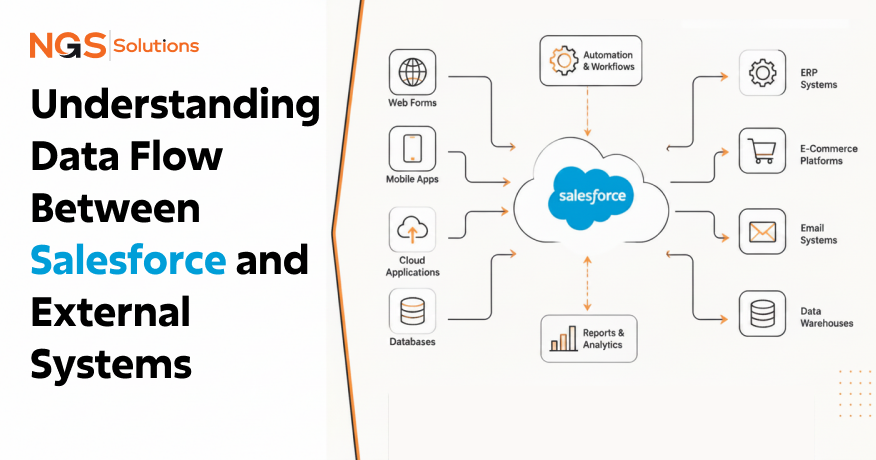
Imagine a sales representative closes a major deal in Salesforce, but the finance team doesn’t see the order in the ERP system for another two days. Customer support has outdated account information, inventory numbers are inaccurate, and leadership is looking at conflicting reports.
This situation is more common than many organizations realize. Modern businesses depend on dozens of connected applications. Salesforce may manage customer relationships, while ERP platforms handle finance and inventory, marketing platforms run campaigns, and customer support tools track service requests. If these systems cannot exchange information effectively, business processes slow down, and data quality suffers. This is where Salesforce data flow becomes critical.
A well-designed Salesforce integration strategy ensures information moves accurately and efficiently between systems. Whether organizations need real-time updates, scheduled synchronization, or large-scale data transfers, understanding how data flows between Salesforce and external systems helps teams make better architectural decisions.
In this guide, you’ll learn how enterprise data movement works, how Salesforce exchanges information with platforms like SAP and Oracle ERP, common integration challenges, and practical approaches for building reliable data pipelines.
What Is Data Flow in Salesforce Integration?
Definition of Data Flow
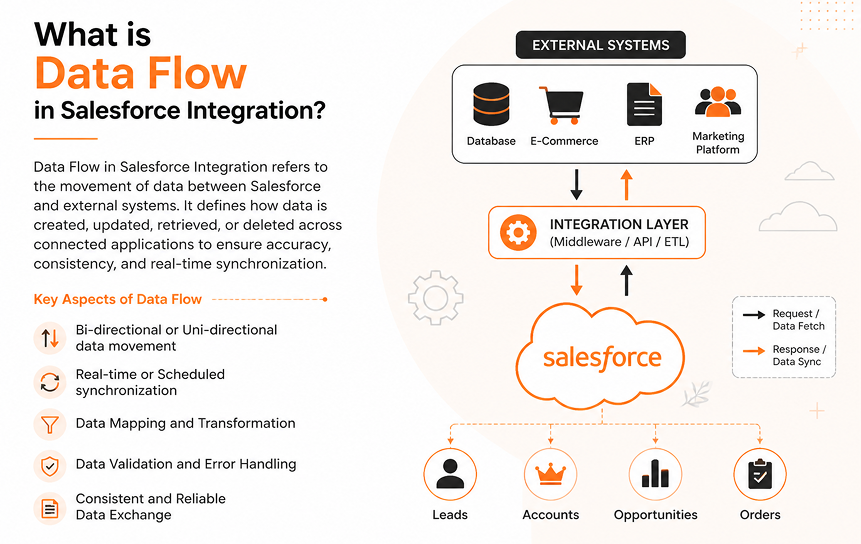
At its most basic, data flow is all about information moving between systems. In a Salesforce environment, data flow includes every process that sends, receives, updates, transforms, or synchronises information between Salesforce and external applications. These processes are often designed and managed through Salesforce integration Solutions. This makes sure that the systems stay aligned and that business data remains consistent across platforms.
Examples include:
- Customer records moving from a website into Salesforce
- Sales orders are being sent to an ERP platform
- Marketing engagement data updating CRM records
- Customer support cases synchronizing across systems
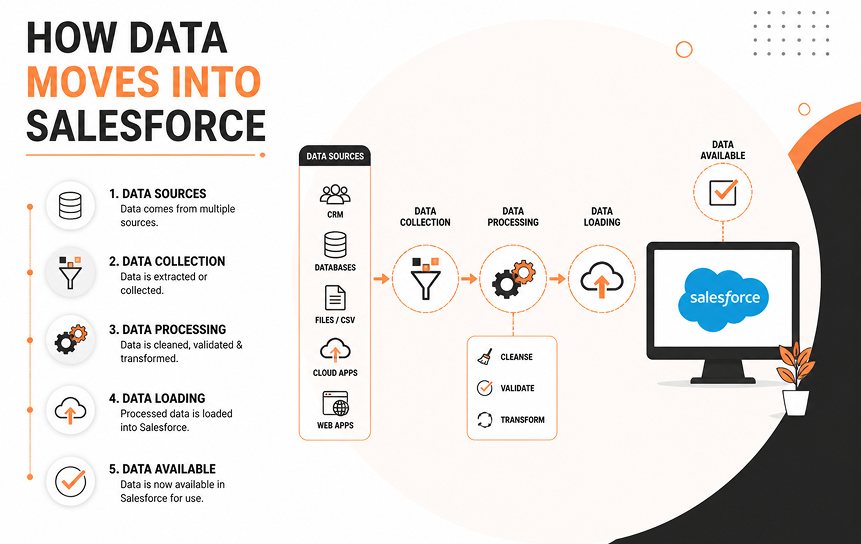
The Salesforce external system data integration process consists of multiple stages, including data collection, validation, transformation, routing, and synchronization.
Why Data Movement Matters
Business operations rely on accurate information. When data remains isolated in separate systems, teams often experience:
- Duplicate records
- Delayed updates
- Manual data entry
- Reporting inconsistencies
- Customer service issues
Organizations that effectively move data between systems can synchronize customer information faster, improve workflow efficiency, and maintain data accuracy across departments.
For example, if a customer updates their billing address through a customer portal, that information should ideally update Salesforce, billing systems, and fulfillment applications automatically.
Role of Integration Architecture
Integration architecture defines how systems communicate. A typical architecture may include:
- APIs
- Middleware platforms
- Data pipelines
- Event messaging systems
- Business logic layers
The way Salesforce is designed affects how information moves, how mistakes are dealt with, and how rules for keeping things in sync are followed. That’s why many teams rely on a best Salesforce integration architecture approach, ensuring data moves in a reliable and controllable way across different systems without creating gaps or inconsistencies.
A simple integration may connect Salesforce directly to another application. Larger enterprises often introduce integration layers that manage routing, security, monitoring, and transformation.
System Communication Overview
System-to-system communication allows applications to exchange information without human intervention.
A typical communication flow looks like this:
- A record changes in Salesforce.
- An integration process detects the change.
- Data is transformed into the required format.
- Information is transmitted.
- The receiving system validates and processes the update.
- Confirmation is returned.
This cycle can happen in milliseconds or on a scheduled basis depending on business requirements.
Importance of Real-Time and Batch Flow
Not all integrations require immediate updates. Real-time data flow in Salesforce integrations is often used when:
- Sales teams need current inventory visibility
- Customer service requires immediate account updates
- Online orders must be processed instantly
Batch processing works well when:
- Large data volumes are involved
- Updates can occur periodically
- Reporting systems need scheduled refreshes
The best approach depends on business priorities, system capabilities, and operational requirements.
How Data Moves Into Salesforce
API-Based Data Ingestion
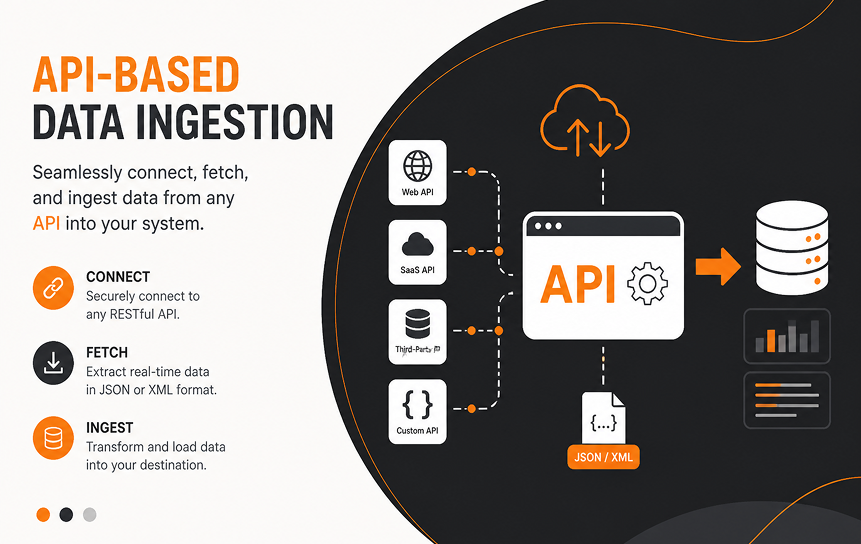
Most modern integrations use APIs. Application Programming Interfaces allow external systems to send information directly into Salesforce.
Common inbound data sources include:
- ERP systems
- Marketing automation platforms
- E-commerce applications
- Mobile applications
- Customer portals
For example, when a customer submits a web form, an API can immediately create a lead record inside Salesforce.
This approach supports near-instant updates and minimizes manual intervention.
Batch Data Imports
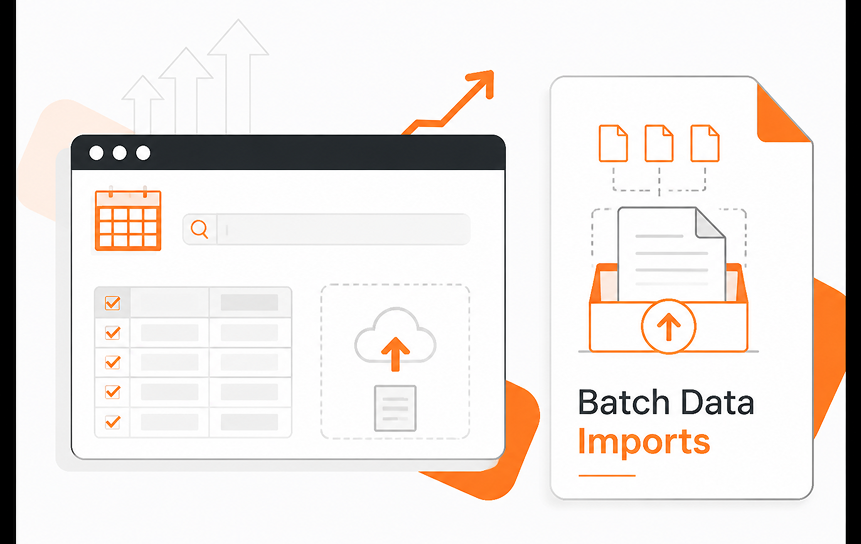
Some organizations process information in large groups. Instead of transmitting records individually, systems collect updates and transfer them on a schedule.
Examples include:
- Nightly customer updates
- Weekly financial reconciliations
- Historical data migrations
Batch imports reduce processing overhead and simplify management of large datasets.
However, they introduce delays that may not be suitable for time-sensitive operations.
Event-Driven Data Updates
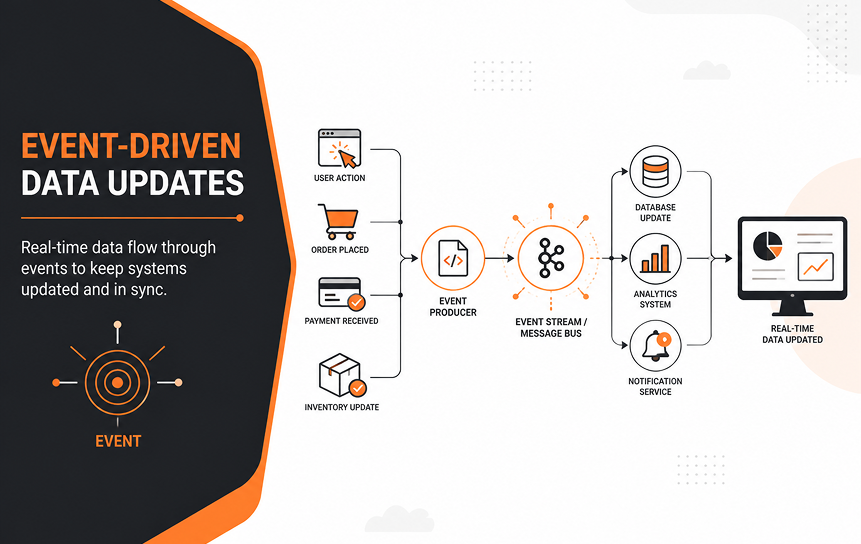
Event-Driven Architecture is becoming increasingly popular in enterprise integration environments. Instead of continuously checking for updates, systems publish events whenever something important happens.
Examples include:
- Opportunity closed
- Customer created
- Order submitted
- Contract renewed
When Salesforce receives these event triggers, it can process information immediately.
This model reduces unnecessary system activity and improves responsiveness.
Middleware-Based Transfers
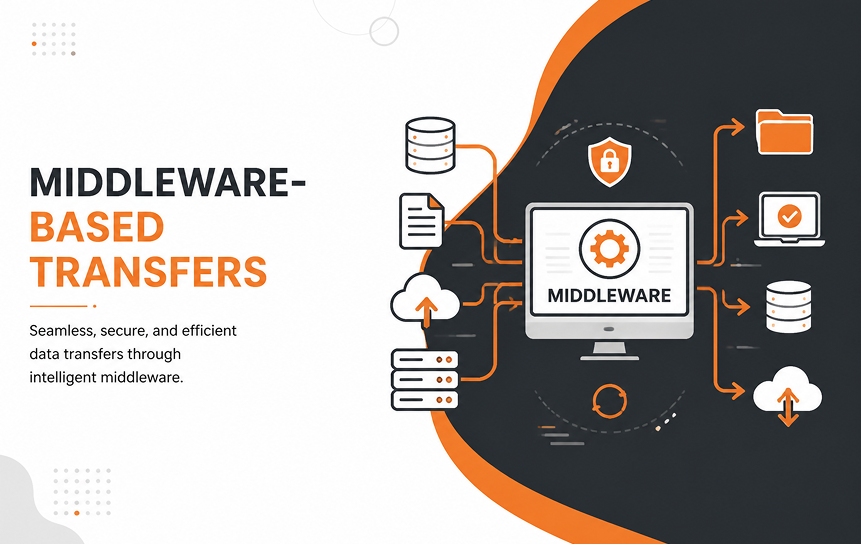
Many organizations use middleware platforms to manage integration complexity. Rather than connecting every application directly to Salesforce, middleware acts as a central hub.
Popular examples include:
- MuleSoft
- Enterprise Service Buses
- Integration Platform as a Service (iPaaS) solutions
Middleware processing can:
- Route information
- Apply business rules
- Transform formats
- Manage security
- Handle errors
This approach simplifies enterprise data flow across large application landscapes.
Data Validation During Ingestion
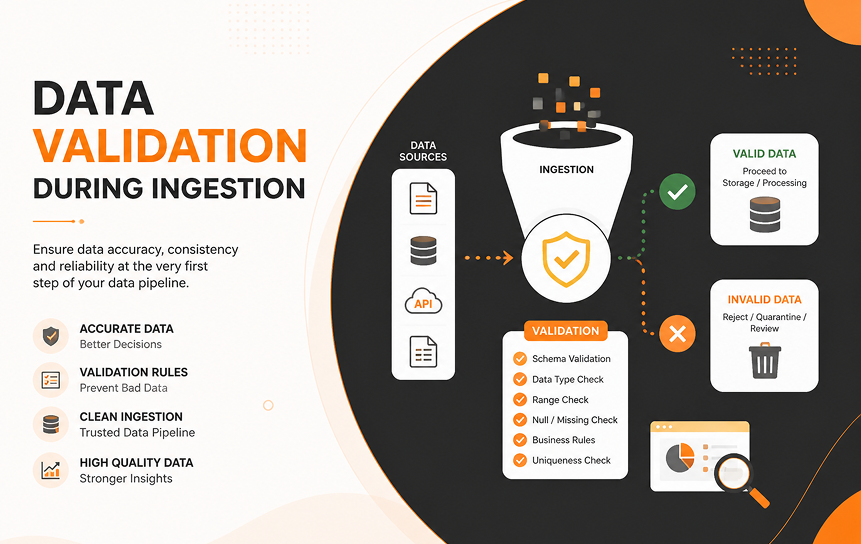
Incoming information should never be accepted blindly. Before data enters Salesforce, validation checks often verify:
- Required fields
- Data formats
- Duplicate records
- Business rules
- Security permissions
These controls help improve data consistency and prevent downstream issues.
For example, customer records may require valid email formats before being accepted.
How Data Moves Out of Salesforce
Data Export via APIs
Salesforce frequently acts as a source of information for other systems. APIs allow external applications to retrieve:
- Customer records
- Opportunities
- Cases
- Products
- Contracts
This enables external teams and systems to access the latest CRM information.
Reporting and Data Sharing Systems
Business intelligence platforms often rely on Salesforce data. Organizations may export information to:
- Data warehouses
- Analytics platforms
- Executive dashboards
- Reporting environments
These exports support strategic decision-making and enterprise reporting.
Event Triggers and Notifications
Salesforce can proactively notify external applications when important events occur.
Examples include:
- Opportunity status changes
- Customer account updates
- New support cases
- Contract approvals
Instead of waiting for scheduled synchronization, external systems receive updates automatically.
This helps enable real-time updates across connected applications.
External System Updates
Many outbound integrations involve operational systems.
Examples include:
- ERP updates
- Inventory management systems
- Shipping platforms
- Billing applications
When a sales order closes, Salesforce may send information directly to fulfillment systems for processing.
This supports business operations without requiring manual intervention.
Data Replication Processes
Some organizations maintain copies of Salesforce data elsewhere. Data replication may support:
- Reporting
- Backup strategies
- Analytics
- Compliance requirements
Careful synchronization rules are necessary to avoid inconsistencies between systems.
Challenges in Salesforce Data Flow
Data Latency Issues
Latency occurs when updates arrive later than expected. Business impacts include:
- Outdated reports
- Inventory discrepancies
- Customer frustration
- Operational delays
Organizations should identify where delays occur and determine whether real-time processing is necessary.
Duplicate Records
Duplicate customer information creates confusion across teams.
Common causes include:
- Multiple data sources
- Inconsistent matching rules
- Poor validation processes
Strong governance and automated duplicate management reduce these risks.
Transformation Errors
Different systems often use different data structures.
For example:
- Salesforce may store states as abbreviations.
- Another application may require full names.
Data transformation failures can prevent successful synchronization.
Testing and mapping reviews are essential.
System Failures
Network outages, API limits, and application downtime can interrupt integrations.
Without proper monitoring, failures may go unnoticed.
Organizations should establish:
- Retry mechanisms
- Alerting systems
- Logging procedures
- Recovery processes
Synchronization Conflicts
Conflicts occur when multiple systems update the same information.
For example:
A customer service application changes a phone number while Salesforce receives a separate update from a marketing platform.
Without clearly defined ownership rules, records may become inconsistent.
Best Practices for Managing Salesforce Data Flow
Define Clear Data Ownership
Every critical data element should have a designated source of truth.
Examples:
- ERP owns product pricing
- Salesforce owns opportunity information
- The customer support system owns the case history
Clear ownership prevents synchronization conflicts.
Standardize Data Formats
Standardization improves compatibility.
Examples include:
- Date formats
- Currency values
- Country codes
- Customer identifiers
Consistent structures simplify integration development.
Use Middleware for Complex Systems
Direct integrations work well for small environments.
Large enterprises often benefit from middleware because it centralizes:
- Security
- Monitoring
- Routing
- Transformation
- Governance
This becomes increasingly valuable as the number of connected applications grows.
Monitor Data Pipelines
Organizations should continuously monitor data pipelines.
Metrics may include:
- Processing times
- Error rates
- Failed transactions
- Throughput volumes
Visibility helps identify issues before they affect business users.
Implement Error Handling Mechanisms
Errors are inevitable.
Successful integrations include:
- Retry logic
- Dead-letter queues
- Alert notifications
- Audit trails
Robust handling prevents small failures from becoming major operational problems.
Real-World Data Flow Scenarios
Salesforce and ERP Integration
One of the most common examples of understanding CRM data movement architecture involves ERP systems.
Salesforce and SAP
A manufacturing company manages customer relationships in Salesforce while inventory and financial operations run in SAP.
Typical flow:
- Opportunity closes in Salesforce
- Order details transfer to SAP
- Inventory availability returns to Salesforce
- Shipping status updates customer records
Sales teams gain visibility while operational teams maintain ERP control.
Salesforce and Oracle ERP
A global services company uses Oracle ERP for financial management.
Data movement includes:
- Customer account synchronization
- Contract information exchange
- Billing updates
- Revenue reporting
This approach helps ensure financial accuracy while supporting sales operations.
These examples illustrate how Salesforce exchanges data with ERP systems in practical business environments.
Salesforce and Marketing Platforms
Marketing systems often exchange:
- Leads
- Campaign responses
- Email engagement metrics
- Customer preferences
CRM data synchronization allows sales representatives to see campaign activity directly within Salesforce.
This creates a more complete customer view.
Salesforce and Customer Support Systems
Support platforms may synchronize:
- Cases
- Customer contacts
- Service history
- Escalations
When service teams update customer information, Salesforce receives those changes automatically.
This improves collaboration across departments.
Salesforce and E-Commerce Platforms
Online stores frequently exchange:
- Orders
- Customer profiles
- Product information
- Purchase history
Real-time synchronization helps sales and support teams access current customer activity.
Multi-System Enterprise Environments
Large organizations often connect:
- Salesforce
- SAP
- Oracle ERP
- Marketing platforms
- Data warehouses
- Support applications
- E-commerce systems
In these environments, integration layers and middleware processing coordinate complex enterprise data flow requirements.
A centralized architecture reduces maintenance effort and improves governance.
Future of Salesforce Data Flow Systems
Real-Time Streaming Architectures
Organizations increasingly expect instant information sharing. Streaming architectures support continuous data movement rather than periodic updates. This reduces latency and improves responsiveness.
AI-Driven Data Routing
Artificial intelligence is beginning to assist integration platforms.
Potential capabilities include:
- Dynamic routing decisions
- Automated prioritization
- Intelligent error handling
- Traffic optimization
These capabilities may improve operational efficiency while reducing manual oversight.
Autonomous Integration Systems
Future platforms will likely automate more integration management tasks.
Examples include:
- Self-healing workflows
- Automated schema mapping
- Predictive monitoring
- Intelligent synchronization adjustments
Human oversight will still be necessary, but routine administration may decrease.
Hyperconnected Cloud Ecosystems
Businesses continue adopting specialized cloud applications. As application portfolios expand, cloud data exchange becomes increasingly important. Organizations will need scalable architectures capable of supporting hundreds of integration points while maintaining governance and reliability.
Conlusion
Salesforce data flow only works well when every system involved knows its role and sticks to it. When data moves cleanly between Salesforce, ERP systems like SAP or Oracle, marketing tools, and support platforms, teams stop wasting time fixing mismatched records and start focusing on actual work.
Most problems we see in real projects don’t come from Salesforce itself. They come from unclear ownership, poorly planned integrations, or mixing too many sync methods without a clear structure. Once that foundation is fixed, everything else becomes easier: reports start matching, customers stop seeing delays, and operations run without constant manual cleanup.
The goal isn’t just to move data between systems. It’s to make sure every piece of information lands in the right place, at the right time, in the right format, without creating extra work for anyone downstream. When that happens, Salesforce stops being just a CRM and becomes a reliable part of the entire business operation.
Get expert help to improve your Salesforce data flow and build a more reliable integration setup. Reach out today.
FAQ
-
What is data flow in Salesforce integration?
Data flow in Salesforce integration refers to the movement of information between Salesforce and other applications. It includes data creation, updates, synchronization, transformation, and exchange across connected systems.
-
How does data enter Salesforce from external systems?
Data typically enters Salesforce through APIs, middleware platforms, batch imports, event-driven integrations, web applications, ERP systems, and marketing platforms.
-
How does Salesforce send data to other systems?
Salesforce can send information using APIs, event notifications, middleware platforms, scheduled exports, and integration workflows that transmit updates to connected applications.
-
What causes data flow issues?
Common causes include network failures, duplicate records, inconsistent data formats, transformation errors, latency problems, and conflicting synchronization rules.
-
Can Salesforce support real-time data flow?
Yes. Salesforce supports real-time integration through APIs, event triggers, platform events, and event-driven architectures that allow immediate information exchange between systems.
-
What tools manage Salesforce data flow?
Common tools include MuleSoft, Salesforce APIs, ETL platforms, iPaaS solutions, middleware platforms, integration monitoring tools, and enterprise messaging systems.


