
In today’s enterprises, the ability to collaborate smoothly across departments, locations, and projects can directly impact business performance. Many organizations rely on digital platforms to manage documents, support team communication, and streamline workflows. However, without a clear strategy, these tools can create fragmented work environments, duplicate content, and slow productivity.
An enterprise SharePoint strategy provides a structured roadmap for designing, implementing, and governing SharePoint as a central hub for collaboration. By leveraging professional enterprise SharePoint consulting services, organizations can ensure that SharePoint goes beyond being a simple document repository, becoming a dynamic platform that supports enterprise workflows, knowledge management, and overall digital workplace objectives.
Why This Blog Matters
This blog is intended for IT leaders, business managers, and digital workplace professionals who want to:
- Understand the essential elements of a scalable SharePoint ecosystem
- Learn best practices for information architecture, collaboration design, and governance
- Gain insight into how consultants approach enterprise SharePoint strategy
- Explore real-world use cases and measurable business outcomes
By following the guidance in this pillar blog, readers can build a SharePoint strategy that:
- Aligns with business processes
- Improves cross-department collaboration
- Enhances knowledge sharing and decision-making
- Provides a clear governance framework to reduce risk
Why Enterprises Need a Strategic Approach to SharePoint

While SharePoint is a powerful tool, many enterprises fail to maximize its potential because they treat it as a technology solution rather than a strategic platform. Deploying SharePoint without a clear plan can lead to inefficiencies that ripple across the organization.
Challenges of Unstructured Collaboration Platforms
1. Fragmented Systems
Organizations often have multiple document repositories spread across network drives, SharePoint sites, and third-party tools. Without a unifying strategy:
- Teams struggle to locate critical documents
- Collaboration occurs in silos, reducing visibility across departments
- Redundant work increases operational costs
2. Inconsistent Workflows
Many businesses implement SharePoint without defining standard workflows for document approvals, project tracking, or knowledge sharing. As a result:
- Employees revert to email and ad hoc tools for collaboration
- Document versioning and updates become confusing
- Projects take longer due to miscommunication
3. Poor Knowledge Management
Without a structured content and taxonomy strategy, knowledge is difficult to capture and share. Common symptoms include:
- Duplicate content across teams
- Outdated information lingering in repositories
- Valuable organizational knowledge is inaccessible to new employees
Examples of Unstructured Collaboration:
- A global marketing team storing campaign assets in multiple local drives
- Sales departments using external chat apps outside SharePoint for document sharing
- HR manages policies in PDFs scattered across emails rather than centralized portals
Consulting Solutions to Address Fragmentation
Enterprise SharePoint consultants approach these challenges by creating structured ecosystems that align with the company’s business objectives. Their strategies often include:
- Site and Document Hierarchy Planning
-
-
- Define top-level hubs for corporate knowledge
- Create department sites, project workspaces, and document libraries
- Define top-level hubs for corporate knowledge
-
- Collaboration Workflow Mapping
-
-
- Identify common cross-team workflows
- Implement SharePoint lists, Power Automate flows, and Teams integrations to support efficiency
- Identify common cross-team workflows
-
- Governance and Compliance Frameworks
-
- Standardize permissions, document retention policies, and content lifecycle management
- Ensure regulatory compliance in industries such as finance, healthcare, or legal
- Standardize permissions, document retention policies, and content lifecycle management
Business ROI:
- Increased Productivity: Employees spend less time searching for documents
- Centralized Knowledge Sharing: Teams access the latest insights from a single source of truth
- Reduced Operational Inefficiency: Streamlined workflows reduce redundancy and errors
Role of SharePoint in Enterprise Digital Workplace Strategy
A strategic SharePoint implementation forms the backbone of the modern digital workplace. When deployed correctly, it enables seamless collaboration, efficient content management, and integration with other productivity tools within the Microsoft 365 ecosystem.
Key Functions in a Digital Workplace:
- Enterprise Intranet Portals: Central hubs for corporate communications, policies, and announcements
- Document Management Systems (DMS): Version control, metadata tagging, and automated workflows
- Knowledge Sharing Hubs: Wikis, internal training documentation, and team collaboration portals
Consulting Approach to Digital Workplace Strategy:
- Analyze Collaboration Needs
-
-
- Conduct stakeholder interviews and workflow analysis
- Identify gaps in knowledge sharing and document management
- Conduct stakeholder interviews and workflow analysis
-
- Design Digital Workplace Architecture
-
-
- Define site structures and document libraries
- Develop departmental and project-based collaboration portals
- Define site structures and document libraries
-
- Integrate Microsoft 365 Tools
-
-
- Combine SharePoint with Teams for communication
- Automate processes with Power Automate
- Visualize business insights with Power BI dashboards
- Combine SharePoint with Teams for communication
-
- Implement Governance Frameworks
-
- Set permission hierarchies based on roles
- Define content lifecycle policies and compliance measures
- Set permission hierarchies based on roles
Business Benefits:
- A unified collaboration environment improves employee engagement
- Standardized document management reduces errors and redundancies
- Enhanced visibility into team activities and project progress improves decision-making
Real-World Example
Scenario: A multinational consulting firm struggled with teams across different countries storing client project documents in local drives and personal SharePoint sites.
Solution: SharePoint consultants developed:
- A corporate hub as a single source of truth
- Department-specific sites for finance, HR, and project teams
- Automated approval workflows for client deliverables
Outcome:
- Reduced document search times by 40%
- Eliminated duplicate versions of client files
- Improved cross-department project collaboration
Core Components of an Enterprise SharePoint Strategy
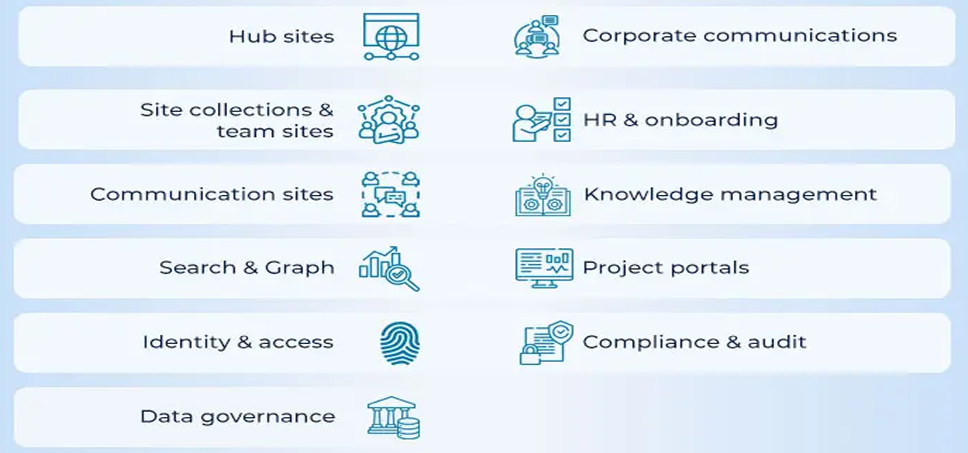
Designing a scalable and effective SharePoint ecosystem requires careful planning of several core components. These elements ensure that your SharePoint environment is organized, intuitive, and aligned with business objectives. Consultants typically focus on four primary pillars: information architecture, collaboration ecosystem design, Microsoft 365 integration, and governance frameworks.
Information Architecture Planning
Information architecture (IA) in SharePoint defines how content, documents, and collaboration spaces are structured across the organization. It provides a blueprint for organizing information so employees can easily find, share, and manage data.
Key Elements of Information Architecture:
- Site Hierarchy Planning
-
-
- Top-level hubs (e.g., Corporate, HR, Finance)
- Departmental sites
- Project-specific workspaces
- Top-level hubs (e.g., Corporate, HR, Finance)
-
- Document Library Structure
-
-
- Separate libraries for each function or project
- Use metadata to classify documents by type, department, or project
- Separate libraries for each function or project
-
- Metadata Frameworks
-
-
- Assign key attributes to documents (e.g., status, client, confidentiality level)
- Enable powerful search and filtering across the organization
- Assign key attributes to documents (e.g., status, client, confidentiality level)
-
- Taxonomy Strategy
-
- Standardized naming conventions and content categories
- Ensure consistency across sites, libraries, and lists
- Standardized naming conventions and content categories
Example Structure:
- Corporate Hub
→ HR Site → Policies & Procedures Library
→ Finance Site → Budget Reports Library
→ Project Workspace → Project Documents Library
Business Benefits:
- Faster document search and retrieval
- Reduced content duplication
- Better knowledge organization, ensuring critical information is accessible
Consulting Insight:
SharePoint consultants often perform content audits before defining IA. This helps identify existing gaps, redundancies, and opportunities to consolidate content, resulting in a more efficient and user-friendly environment.
Collaboration Ecosystem Design
Collaboration ecosystem design focuses on structuring spaces that enable teams to work together efficiently, share knowledge, and manage projects without friction.
Components:
- Team Collaboration Spaces: Sites for project teams with shared documents, tasks, and calendars
- Department Portals: Centralized resources for department-specific workflows
- Project Workspaces: Temporary or permanent sites for project-specific documents and collaboration
- Knowledge Repositories: Central hubs for training materials, internal wikis, and institutional knowledge
Benefits:
- Improved cross-department communication
- Faster project execution and tracking
- Enhanced employee collaboration and engagement
Example:
A product development team has a dedicated workspace with:
- A document library for design specifications
- A task list integrated with Microsoft Planner
- A knowledge wiki for lessons learned from previous projects
Consulting Insight:
Consultants map collaboration workflows to the SharePoint structure, ensuring the system supports how teams actually work rather than forcing employees to adapt to rigid structures.
Integration with Microsoft 365 Ecosystem
SharePoint becomes more powerful when integrated with other Microsoft 365 tools, creating a unified digital workplace.
Common Integrations:
- SharePoint + Teams: Real-time communication embedded with document collaboration
- SharePoint + Power Automate: Automate repetitive workflows, approvals, and notifications
- SharePoint + Power BI: Connect data sources for advanced business insights and dashboards
- SharePoint + OneDrive: Seamless file storage and synchronization across devices
Benefits:
- Centralized productivity ecosystem
- Automated processes reduce manual effort
- Improved data visibility and reporting
Consulting Approach:
Consultants analyze existing productivity tools and workflows, then design integration strategies that maximize ROI while reducing redundancy. For example, automating document approvals through Power Automate can cut review cycles from days to hours.
Governance and Compliance Strategy
A governance strategy ensures that SharePoint environments remain secure, organized, and compliant with organizational policies and industry regulations.
Key Components:
- Permission Models: Role-based access to sites, libraries, and documents
- Document Retention Policies: Rules for archiving or deleting documents after a set period
- Compliance Rules: Adherence to legal or industry standards (e.g., GDPR, HIPAA)
- Content Lifecycle Management: Ensures documents are reviewed, updated, or retired systematically
Business Benefits:
- Enhanced data security and reduced risk of unauthorized access
- Regulatory compliance, avoiding potential fines or penalties
- Maintains order and consistency across the SharePoint environment
Consulting Insight:
Effective governance balances security and usability. Overly restrictive permissions can frustrate users, while overly lenient controls can create compliance risks. Consultants help enterprises find the right equilibrium.
Real-World Example
Scenario: A healthcare organization needed to manage thousands of sensitive patient documents while enabling collaboration among clinical and administrative teams.
Solution:
- Built a tiered site hierarchy separating administrative, clinical, and research content
- Integrated SharePoint with Teams for real-time communication
- Implemented strict permission models and retention policies to comply with HIPAA
Outcome:
- Streamlined collaboration without compromising security
- Reduced document retrieval times by 50%
- Ensured compliance with federal healthcare regulations
How SharePoint Consultants Design Scalable Collaboration Architectures
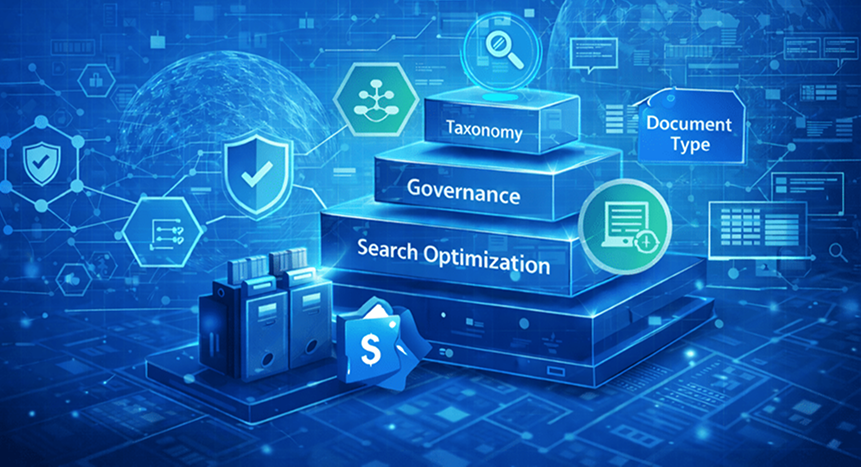
Designing a SharePoint environment for an enterprise is not just about deploying sites and libraries; it’s about creating a scalable collaboration ecosystem that can evolve as the organization grows. Consultants approach this process systematically, ensuring that SharePoint supports business workflows, knowledge sharing, and productivity objectives while remaining flexible for future expansion.
Enterprise Collaboration Architecture Planning
Enterprise collaboration architecture defines the structural design of SharePoint sites, portals, and content repositories to optimize team collaboration, project management, and organizational knowledge sharing.
Step-by-Step Planning Process:
- Analyze Organizational Structure
-
-
- Map departments, teams, and reporting hierarchies
- Identify functional areas with high collaboration needs
- Determine interdependencies between teams
- Map departments, teams, and reporting hierarchies
-
- Identify Collaboration Workflows
-
-
- Document common processes such as approvals, project reviews, and content creation
- Pinpoint pain points in current collaboration methods
- Capture requirements for real-time communication and document sharing
- Document common processes such as approvals, project reviews, and content creation
-
- Design Hub Sites and Department Portals
-
-
- Establish top-level hubs for corporate communications
- Create department and project-specific portals for focused collaboration
- Ensure consistent navigation and naming conventions across all sites
- Establish top-level hubs for corporate communications
-
- Define Document Management Structures
-
- Implement libraries, folders, and metadata frameworks tailored to team needs
- Establish version control and automated workflows to reduce errors
- Align content lifecycle policies with compliance requirements
- Implement libraries, folders, and metadata frameworks tailored to team needs
Benefits of a Well-Planned Architecture:
- Scalable collaboration infrastructure that grows with the enterprise
- Simplified navigation and site discovery
- Reduced risk of content duplication and loss
- Streamlined onboarding for new employees
Consulting Insight:
Consultants often conduct workshops with team leads to map workflows before building the architecture. This ensures the platform reflects real-world collaboration patterns rather than theoretical models.
Knowledge Management System Design
A knowledge management (KM) system enables employees to easily access organizational knowledge, training materials, and expertise, improving decision-making and productivity.
Key Design Principles:
- Centralized Knowledge Portals
-
-
- Host internal wikis, FAQs, and policies
- Use metadata tagging to categorize knowledge for easy search
- Host internal wikis, FAQs, and policies
-
- Training Documentation Systems
-
-
- Organize onboarding manuals, video tutorials, and learning resources
- Enable self-service learning for employees across departments
- Organize onboarding manuals, video tutorials, and learning resources
-
- Collaborative Knowledge Capture
-
- Encourage employees to contribute insights and lessons learned
- Track updates and maintain version control to ensure accuracy
- Encourage employees to contribute insights and lessons learned
Business Benefits:
- Faster decision-making due to accessible knowledge
- Reduced information search time
- Increased employee engagement and empowerment
A global engineering firm implemented a SharePoint knowledge hub containing project retrospectives, design best practices, and regulatory guidelines. Teams could search by metadata such as project type or client, reducing repetitive mistakes and increasing project efficiency.
KM system design emphasizes balancing structure with usability. Overly complex taxonomies hinder adoption, while too simple structures fail to capture valuable details. Consultants use analytics and user feedback to optimize the system iteratively.
Enterprise Content Management Strategy
Enterprise content management (ECM) involves organizing, storing, and governing large volumes of enterprise documents while ensuring compliance and accessibility.
Key Elements of ECM in SharePoint:
- Document Classification Frameworks
-
-
- Categorize documents by department, project, or content type
- Apply metadata tags for search optimization
- Categorize documents by department, project, or content type
-
- Version Control Policies
-
-
- Maintain historical versions for auditing and rollback
- Reduce duplicate content and errors
- Maintain historical versions for auditing and rollback
-
- Automated Lifecycle Management
-
- Schedule archiving or deletion of obsolete documents
- Ensure compliance with regulatory retention requirements
- Schedule archiving or deletion of obsolete documents
Benefits:
- Improved document governance
- Enhanced compliance with industry regulations
- Reduced storage overhead and improved system performance
Example:
A financial services company implemented a SharePoint ECM system to manage client contracts, audit reports, and regulatory filings. Automated retention policies and version control ensured compliance while reducing manual document handling by 60%.
Consulting Insight:
Consultants often integrate ECM with workflow automation tools like Power Automate to streamline approvals and document reviews, turning content management from a manual process into an efficient, automated system.
Real-World Outcome of Scalable Architecture Planning
Scenario: A multinational enterprise faced challenges with siloed knowledge, inconsistent workflows, and fragmented SharePoint sites.
Consulting Approach:
- Mapped the entire organizational structure and identified critical collaboration workflows
- Designed hub sites, departmental portals, and project workspaces aligned with business needs
- Implemented knowledge management systems and ECM frameworks
- Integrated SharePoint with Teams, Power Automate, and Power BI for a unified digital workplace
Results:
- 50% reduction in document search time
- Streamlined collaboration across 12 global offices
- Consistent governance and compliance adherence
- Improved ROI on Microsoft 365 and SharePoint investments
Business Benefits of a Well-Designed SharePoint Strategy
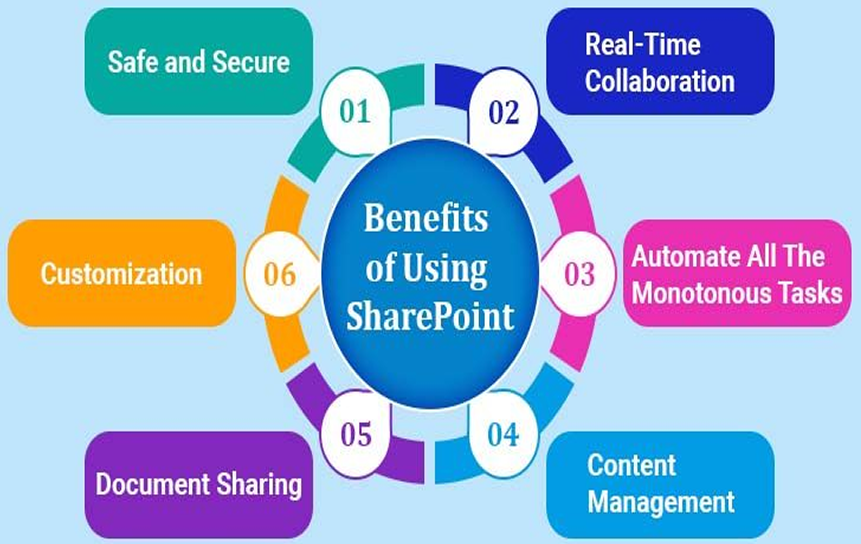
Implementing a structured enterprise SharePoint strategy goes beyond technology deployment; it drives tangible business results. Well-planned SharePoint ecosystems improve collaboration, knowledge sharing, employee productivity, and overall operational efficiency.
Improved Collaboration Efficiency
Collaboration efficiency refers to how seamlessly teams can communicate, share documents, and execute workflows without delays or confusion.
How SharePoint Improves Collaboration:
- Centralized document libraries reduce the time spent searching for files
- Team and project workspaces enable real-time collaboration
- Integration with Microsoft Teams allows synchronous communication with shared context
Example:
A consulting firm implemented SharePoint team sites for all client projects. Each workspace contained project timelines, task lists, and key deliverables. With version-controlled document libraries, team members avoided sending multiple email attachments.
Measurable Outcome:
- Reduced project delays by 35%
- Faster collaboration across geographically distributed teams
Better Knowledge Sharing Across Departments
Knowledge sharing ensures that employees have access to the right information at the right time, improving decision-making and reducing redundant work.
How SharePoint Supports Knowledge Sharing:
- Knowledge portals consolidate best practices, FAQs, and training materials
- Metadata and taxonomy make documents discoverable across departments
- Wikis and internal discussion boards allow employees to contribute insights
Example:
An enterprise technology company built a SharePoint knowledge hub containing coding standards, deployment guides, and lessons learned from prior projects. Engineers could search by project type, client, or technology stack.
Measurable Outcome:
- Reduced repeated mistakes by 40%
- Enabled cross-team learning and faster problem resolution
Higher Employee Productivity
Employee productivity improves when teams spend less time on administrative tasks and more time on value-generating activities.
SharePoint Features Driving Productivity:
- Automated workflows reduce manual approvals and repetitive tasks
- Centralized document repositories minimize searching and duplication
- Alerts and notifications ensure timely action on tasks and updates
A marketing team used SharePoint integrated with Power Automate to route campaign approvals automatically. This eliminated the need for multiple emails and follow-ups.
Measurable Outcome:
- Campaign launch timelines shortened by 25%
- Employee time spent on administrative tasks decreased significantly
Scalable Digital Workplace Infrastructure
A scalable infrastructure allows organizations to expand their collaboration platforms without major redesigns or disruptions.
How SharePoint Achieves Scalability:
- Hub sites and site collections provide a framework for growth
- Metadata-driven content organization supports large volumes of documents
- Integration with Microsoft 365 ensures additional tools can be added as needed
A global law firm expanded its SharePoint architecture as new offices opened worldwide. Predefined hubs and departmental templates allowed quick site creation for new teams while maintaining consistent governance.
Measurable Outcome:
- Rapid onboarding of new departments and offices
- Consistent collaboration standards across global teams
Improved Technology ROI
Technology ROI measures how effectively investments in collaboration platforms generate business value.
How a Strategic SharePoint Deployment Maximizes ROI:
- Reduces costs associated with redundant tools and document duplication
- Increases adoption of the Microsoft 365 ecosystem by centralizing workflows
- Streamlines processes, saving employee hours and reducing operational inefficiencies
Example:
An enterprise implemented a comprehensive SharePoint strategy, integrating Teams, Power Automate, and Power BI dashboards. This replaced multiple legacy collaboration tools.
Measurable Outcome:
- Reduced software licensing costs by 20%
- Increased productivity and collaboration led to a quantifiable improvement in project delivery times
Mid-Blog Call to Action
Organizations aiming to build enterprise collaboration ecosystems can benefit from expert SharePoint consulting guidance for strategy and architecture planning. Partnering with professionals ensures a scalable, secure, and efficient deployment aligned with business objectives.
Future Trends in Enterprise Collaboration Platforms

The digital workplace is evolving rapidly. Enterprises adopting SharePoint today must plan for the future to remain competitive, efficient, and agile. Emerging trends focus on AI-powered capabilities, intelligent automation, and integrated collaboration ecosystems that enhance productivity and decision-making.
AI-Powered Knowledge Management
AI-powered knowledge management systems use machine learning and natural language processing to surface relevant information, discover patterns, and recommend actionable insights.
How It Works with SharePoint:
- AI algorithms analyze document content and metadata to provide intelligent search results
- Machine learning identifies related content and suggests knowledge connections
- AI-powered dashboards summarize insights from multiple sources across the enterprise
Practical Example:
A global consulting firm implemented an AI knowledge hub within SharePoint. When employees searched for client engagement strategies, the system recommended relevant project documents, lessons learned, and internal reports automatically.
Business Benefits:
- Reduced time spent searching for critical information
- Improved decision-making with contextual insights
- Enhanced knowledge retention across teams
Consulting Insight:
SharePoint consultants integrate AI tools such as Microsoft Copilot and AI-powered search capabilities to augment traditional knowledge management systems, ensuring employees have instant access to the right information.
Intelligent Document Automation
Intelligent document automation leverages AI to handle repetitive tasks, extract key data, and manage content lifecycles with minimal human intervention.
Applications in SharePoint:
- Automated extraction of metadata from incoming documents
- AI-driven categorization and tagging of large document sets
- Smart workflow routing for approvals and compliance checks
Example:
A financial institution used SharePoint integrated with AI automation to process client contracts. The system automatically identified document types, tagged metadata, and routed contracts to the correct legal or compliance teams.
Business Benefits:
- Reduces manual processing time by 50% or more
- Minimizes human error in document handling
- Improves regulatory compliance through automated checks
Consulting Insight:
Consultants design AI document automation strategies tailored to enterprise workflows, ensuring automation enhances efficiency without disrupting user adoption or governance standards.
Integrated Collaboration Ecosystems
Modern enterprises require connected platforms where teams, workflows, and data interact seamlessly. SharePoint, as part of the Microsoft 365 ecosystem, provides a foundation for integrated collaboration.
Key Features:
- Centralized access to Teams, Power Automate, Power BI, and OneDrive within SharePoint
- Unified dashboards to monitor project progress, team productivity, and document usage
- Cross-platform collaboration between desktop, mobile, and cloud environments
A global manufacturing company integrated SharePoint with Teams and Power BI. Employees could edit documents in real-time, track project KPIs on dashboards, and communicate across departments without leaving the platform.
Business Benefits:
- Improved visibility into ongoing projects and organizational data
- Seamless workflow execution across tools
- Enhanced collaboration across remote and hybrid teams
Consulting Insight:
SharePoint consultants advise enterprises on ecosystem integration strategies, balancing user experience with governance, security, and scalability.
How Enterprises Can Prepare for Future Trends
- Adopt AI and Automation Gradually
-
-
- Start with high-impact, repetitive processes
- Expand AI usage as employees become comfortable
- Start with high-impact, repetitive processes
-
- Standardize Collaboration Workflows
-
-
- Ensure processes are well-documented and optimized before automation
- Reduce risk of errors during AI adoption
- Ensure processes are well-documented and optimized before automation
-
- Invest in Scalable Architecture
-
-
- Design SharePoint sites, hubs, and libraries to accommodate growing data and users
- Integrate with other Microsoft 365 tools for maximum flexibility
- Design SharePoint sites, hubs, and libraries to accommodate growing data and users
-
- Engage Expert Consultants
-
- Leverage SharePoint strategy consulting experts to align technology with business objectives
- Ensure governance, compliance, and usability are maintained
- Leverage SharePoint strategy consulting experts to align technology with business objectives
By embracing these trends, enterprises can transform SharePoint from a static content repository into a dynamic, AI-powered collaboration hub that drives productivity, engagement, and strategic advantage.
Final Thoughts
Investing in a well-planned enterprise SharePoint strategy gives your organization more than just technology. It creates a flexible collaboration hub that helps teams work smarter, share knowledge easily, and get more done.
By combining clear site structures, automated workflows, governance rules, and even AI-powered features, your SharePoint environment can become a modern, future-ready digital workplace.
Whether your goal is to streamline team processes, improve knowledge sharing, or boost overall productivity, a thoughtful enterprise SharePoint strategy is the key to long-term success.
Book a consultation with our professional SharePoint consulting guidance to streamline your workflows and enhance internal process control today.
FAQ’s
Answering the most common enterprise SharePoint strategy questions ensures clarity for both beginners and advanced users alike.
-
What is an enterprise SharePoint strategy?
An enterprise SharePoint strategy is a plan for how a company uses SharePoint to organize documents, manage workflows, and help teams work together efficiently. Instead of just storing files, it turns SharePoint into a central hub for collaboration, knowledge sharing, and productivity. This strategy often includes a SharePoint collaboration strategy, a clear SharePoint enterprise architecture, and frameworks for enterprise workflow platforms to make sure the system works smoothly across the entire organization.
-
How do consultants design SharePoint collaboration architecture?
Consultants start by understanding how your teams work and what your business needs. They map out your workflows and then design a SharePoint collaboration ecosystem that connects department sites, project workspaces, and knowledge hubs. By integrating tools in the Microsoft 365 ecosystem and sometimes AI-powered collaboration platforms, they make sure teams can collaborate in real time, reduce silos, and keep information organized. Think of it as building a blueprint for how everyone shares, updates, and finds the content they need.
-
What components are required for SharePoint strategy planning?
A strong SharePoint strategy usually includes:
- Information Architecture: How your sites, libraries, and metadata are organized for easy access
- Collaboration Ecosystem Design: Team spaces, project sites, and departmental portals
- Governance and Compliance: Rules for who can see or edit content, and retention policies
- Integration with Microsoft 365: Using Teams, Power Automate, and Power BI for smooth workflows
- Content Management Architecture: How documents and files are structured, versioned, and maintained
- Knowledge Management Platforms: Central hubs for training materials, FAQs, and organizational knowledge
These pieces help with SharePoint digital workplace strategy and building an enterprise SharePoint collaboration framework that’s easy to use and scale.
-
How does SharePoint strategy improve digital workplace productivity?
A clear SharePoint digital workplace strategy makes work faster and simpler. Employees spend less time searching for documents, approval processes are automated, and teams can collaborate in real time. Integration with the Microsoft 365 ecosystem allows you to track tasks, run reports, and visualize data in dashboards. Advanced features like AI knowledge discovery systems and AI document intelligence tools can even suggest relevant content or automate routine tasks, so your teams can focus on higher-value work.
-
How long does enterprise SharePoint strategy planning take?
The planning timeline depends on the size and complexity of your organization. Small to mid-sized businesses can usually complete enterprise SharePoint planning in about 6–12 weeks, while large enterprises with multiple offices or departments may need 3–6 months. Factors like SharePoint enterprise architecture planning, workflow complexity, and content migration all affect the schedule. Working with a SharePoint consulting firm for enterprises can help speed things up and ensure nothing is overlooked.
-
Why should businesses hire consultants for SharePoint strategy?
Hiring experts ensures your SharePoint system is set up to actually work for your business. Consultants provide guidance on SharePoint strategy for digital transformation, build a scalable enterprise SharePoint collaboration framework, and create a SharePoint digital workplace architecture strategy that fits your workflows. They also help with content management architecture, knowledge management platforms, and governance frameworks, so your system stays organized, secure, and compliant. In short, professional enterprise SharePoint strategy consulting reduces risk, saves time, and ensures your SharePoint investment delivers maximum value.


