
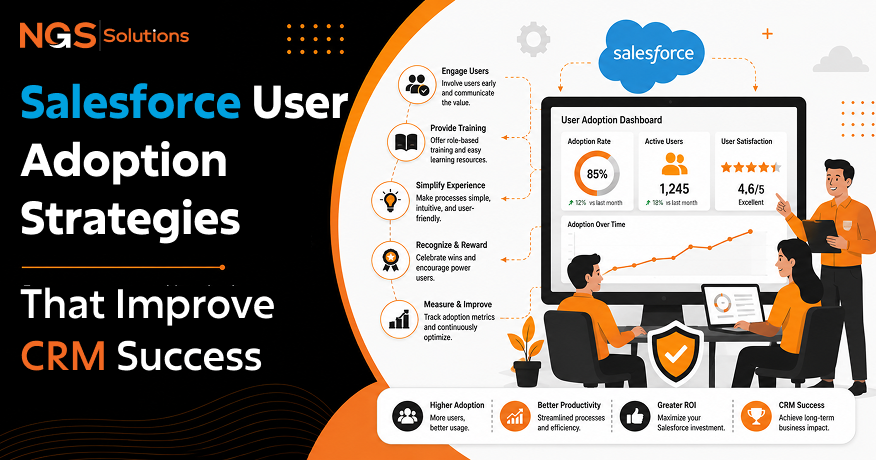
Salesforce is one of the most powerful software tools in the world. It helps companies manage customer relationships, close more deals, and grow revenue.
However, buying software is only the first step. The true test of success comes when your team logs in every day and enters good information.
Many businesses spend small fortunes on user licenses. Yet, their teams still track sales in spreadsheets or write notes on paper.
When your employees skip the software, your data suffers. Your sales forecasts become guesswork, and your growth slows down.
Improving Salesforce user adoption is not about forcing people to click buttons. It is about building a modern CRM culture that helps workers save time and close deals faster.
This comprehensive Salesforce adoption guide gives you practical Salesforce adoption strategies to help your team love using the platform.
Why Salesforce User Adoption Matters
Understanding why employees don’t use Salesforce is important, but knowing why usage matters is where change begins. Strong software usage changes how your company operates daily.
High User Adoption = Better Data – Stronger Insights – Faster Growth
Business Value of High Adoption
High user adoption turns your database into a single source of truth. Every phone call, email, and customer note is stored in one place. With Salesforce Premier Support & Management, your CRM stays optimized, helping teams maintain accurate data and reliable workflows as usage grows.
When workers share access to good information, business handoffs become smooth. Sales reps pass warm leads to account managers without losing details. Support teams resolve customer issues faster because they can view complete customer histories.

Expert Insight: Software adoption is not an IT project. It is a fundamental shift in business culture. When data flows cleanly across teams, your cost to win new customers drops significantly.
Impact on CRM ROI
Your company pays for every seat license in your account. If employees do not use the tool, that money is wasted.
High Salesforce CRM adoption ensures that every license yields real financial returns.
- You lower operational costs by eliminating repetitive tasks.
- You increase win rates by having your sales team manage deals faster.
- You retain more customers through personalized service.
Common Adoption Challenges
Getting an entire company to adopt new software is hard. Old habits die slowly, and people naturally resist change.
Common Challenges:

Many workers feel that software tools exist only so managers can track their work. Others feel overwhelmed by cluttered screens and confusing fields. Salesforce Support and Maintenance helps businesses overcome these challenges by keeping the platform optimized, user-friendly, and aligned with changing needs.
A proven Salesforce adoption framework combines management support, clean software design, ongoing optimization, and clear employee training to help teams confidently use the system. This approach improves user adoption and enables employees to get more value from Salesforce.
Why Employees Resist Using Salesforce
To solve usage issues, you must know why workers avoid the system. Most people do not dislike software without a reason. They resist it when it makes their work harder instead of easier.

Poor Training
Many companies make the mistake of using generic training videos during launch week. They show employees every button in the system at once.
When training is broad and fast, employees forget what they learned within a week. Without role-specific guidance, staff feel lost and return to their old ways of working.
Complicated Processes
Admins often build complex systems with dozens of mandatory fields. When a sales rep must fill out 20 fields just to record a quick phone call, they stop doing it.
Complex workflows slow down daily tasks. If entering data takes longer than making the actual sale, Salesforce employee adoption will plummet.
Low Data Quality
Nothing kills user interest faster than dirty data. When reps log in and see old phone numbers, duplicate contacts, or missing deal sizes, they lose trust in the tool.
If users feel the software holds bad information, they will not rely on it for daily work.

Lack of Leadership Support
If executives and managers do not use reports generated directly from the software, employees will not use the system either.
Key Rule: If a manager accepts pipeline updates via email or spreadsheets instead of the CRM, reps will stop updating their records.
Poor User Experience
A bad page setup damages Salesforce user engagement. Cluttered navigation menus, confusing screen names, and slow page load times frustrate users.
If the screen is hard to read, workers will do everything they can to avoid using it.
Building an Effective Salesforce Adoption Plan
To drive real system usage, you need a detailed strategy before rolling out changes. A structured Salesforce onboarding plan keeps your whole team aligned.

Set Clear Goals
Do not just tell your team to “use the software more.” Set specific business goals for every department.
- Sales: All active deals must have a set close date and assigned next steps.
- Support: All client help tickets must be logged within the portal.
- Marketing: All new leads must receive follow-up notes inside 24 hours.
Involve Stakeholders Early
Bring team leaders and top sales reps into the design phase early. Ask them what daily tasks annoy them most.
When workers help build the solution, they naturally become internal product advocates. This focus on stakeholder engagement builds early momentum before launch day.
Define Success Metrics
You must know what success looks like before you start measuring it. Pick quantifiable adoption metrics to track over time.

Create an Adoption Roadmap
A good Salesforce onboarding checklist guides your team through rollout step-by-step. Break your implementation plan into clear phases:
- Phase 1: Setup: Clean up dirty records and simplify screen layouts.
- Phase 2: Alpha Test: Run a two-week trial with top team members to get feedback.
- Phase 3: Role Training: Hold small interactive workshops focused on daily job roles.
- Phase 4: Official Launch: Mandate that all team updates run strictly through the system.
- Phase 5: Refinement: Review usage metrics monthly and make minor fixes based on user requests.
Best Practices for Increasing Salesforce Adoption

Small, focused changes to your platform can lead to big increases in team usage. Here are actionable Salesforce user adoption best practices to implement today.

Simplify Page Layouts
Keep your main screens clean. Hide fields that your team does not use every day. Use dynamic layouts so extra fields show up only when needed.
Put key details like contact phone numbers, email addresses, and deal amounts right at the top of the screen.

Reduce Manual Data Entry
Manual typing takes time and leads to typing mistakes. Integrate your email and calendar tools directly into your system.
Use inbox integrations to log emails, schedule meetings, and create new contact records with a single click.
Provide Role-Based Training
Avoid generic platform walk-throughs. Host practical Salesforce training strategies built around specific daily jobs.

Follow proven Salesforce training best practices by keeping learning sessions under 30 minutes. Focus on practical tasks like “How to log a call in 30 seconds.”
Encourage User Feedback
Build a clear path for users to report bugs or request changes. Add a simple “System Feedback” button directly inside the app navigation bar.
When users see that you listen to their suggestions and fix platform issues quickly, their trust in the tool grows.
Automate Repetitive Tasks
Use built-in workflow rules to automate routine tasks. Set up automatic task creation when a deal changes stages and build automated email alerts for key account changes. Salesforce Platform Administration Services help manage configurations, optimize workflows, and keep the CRM aligned with evolving business requirements.
When the system saves employees time on administrative work, increasing CRM adoption among employees becomes much easier.
Measuring User Adoption
You cannot improve what you do not measure. Regularly tracking platform data helps you catch user issues early before bad habits take root.
Key Metrics: Logins | Field Completion | Dashboard Usage | Reports | Automations
Login Frequency
Track how often team members log into the system each week. A worker logging in once a week is a clear red flag.
Look for steady daily active user numbers across every team.
Record Completion Rates
Look at how completely team members fill out key contact and deal records. High login rates mean little if reps skip key fields.
Data Completion Quality:

Target zero missing values on critical fields like deal amounts, close dates, and contact details.
Dashboard Usage
Check how often team leaders view and refresh management dashboards.
When managers use platform dashboards during weekly check-ins, team members quickly learn to keep their data accurate.
Report Usage
Monitor how often teams run and export system reports. High report usage shows that employees rely on the software to make smart daily decisions.
Automation Utilization
Track how often your team triggers automated tasks and email templates. High automation activity means your staff uses time-saving tools effectively.
Tools That Support Better User Adoption
Salesforce offers built-in tools designed to make onboarding easy and drive user engagement.

Salesforce Trailhead
Trailhead is a free, interactive learning platform. You can create custom learning paths (Trailmixes) tailored specifically to your company processes.
Gamify learning by rewarding team members who earn badges and complete modules on time.
In-App Guidance
Use native pop-up prompts and walkthroughs to guide workers right inside the software interface.
You can highlight new feature updates, remind users to fill out required fields, or guide new hires through their first pipeline updates step-by-step.
Example In-App Prompt:

Reports & Dashboards
Build visual dashboards that display team wins, active sales leaderboards, and personal goal progress.
When employees see their names on public leaderboards, peer encouragement naturally drives higher software usage.
Salesforce Mobile App
Give mobile teams access to the app on their smartphones. Field reps can log client notes, record voice updates, and look up phone numbers on the road.
Desktop Usage -> Main Office Work
Mobile App -> On-the-Road Field Updates & Quick Calls
Chatter Collaboration
Replace internal email clutter by using Chatter for deal conversations.
Tag team members directly inside specific account records to discuss deal details. Keeping conversations inside records builds a shared knowledge base for everyone.
Long-Term Strategies for Sustainable CRM Adoption
Real software success requires ongoing effort. Use these long-term strategies to keep your team engaged for years to come.

Continuous Training
Never stop training after the initial software launch. Run monthly 15-minute refresher mini-workshops to cover advanced features, new updates, and user tips.
Continuous learning keeps software skills sharp across every team.
Quarterly Reviews
Schedule quarterly audits to inspect system setup and usage statistics.
Remove unused fields, clean up old records, and adjust workflows based on updated company goals. Keeping the system lean prevents layout clutter over time.
Recognition Programs
Reward your top platform users. Give monthly awards or gift cards to reps with the most updated records, cleanest data, or highest activity counts.
Monthly Adoption Hero Award:
– Cleanest Data Record Entry
– Fastest Lead Response Time
– Most Chatter Help Responses
Recognizing top users builds a fun CRM culture focused on software excellence.
Process Improvements
Your business changes over time, and your software setup must change with it.
Regularly update page layouts, validation rules, and automated workflows so your tools always match current business processes.
Governance and Documentation
Maintain clear documentation for every custom field, workflow, and system policy.
Establish a simple governance board to review new change requests before admins build them. Proper oversight keeps your platform clean, fast, and easy to use.
Final Thoughts
Achieving strong Salesforce user adoption is a journey, not a single task. It takes time, clear planning, and ongoing care.
When you simplify page designs, automate manual data entry, and offer role-based training, your employees stop fighting the system. They start seeing it as a powerful assistant that helps them succeed.
Focus on helping your team save time every day. Listen to user feedback, clean up messy screens, and celebrate software wins together.
With a strong strategy, your CRM turns from an expensive line item into your team’s favorite tool for driving company growth.
FAQs
-
What is Salesforce user adoption?
Salesforce user adoption measures how consistently and effectively employees use the Salesforce platform for their daily work tasks, customer tracking, and record keeping.
-
Why do employees stop using Salesforce?
Employees stop using Salesforce when page layouts are cluttered, fields are confusing, manual data entry takes too much time, or leadership fails to emphasize its use.
-
How can businesses improve CRM adoption?
Businesses can improve CRM adoption by simplifying screen layouts, automating routine data entry tasks, offering short role-based training, and collecting regular user feedback.
-
What metrics measure Salesforce user adoption?
Key adoption metrics include login frequency, field completion rates, dashboard updates, report usage counts, and total automated tasks run by employees.
-
Does employee training improve Salesforce adoption?
Yes. Role-based, interactive training helps workers understand how the software makes their daily job easier, which directly drives long-term usage rates.
-
What Salesforce tools help increase user engagement?
Native tools like Salesforce Trailhead, In-App Guidance, Chatter collaboration, visual dashboards, and the Salesforce Mobile App help boost daily user engagement.


