
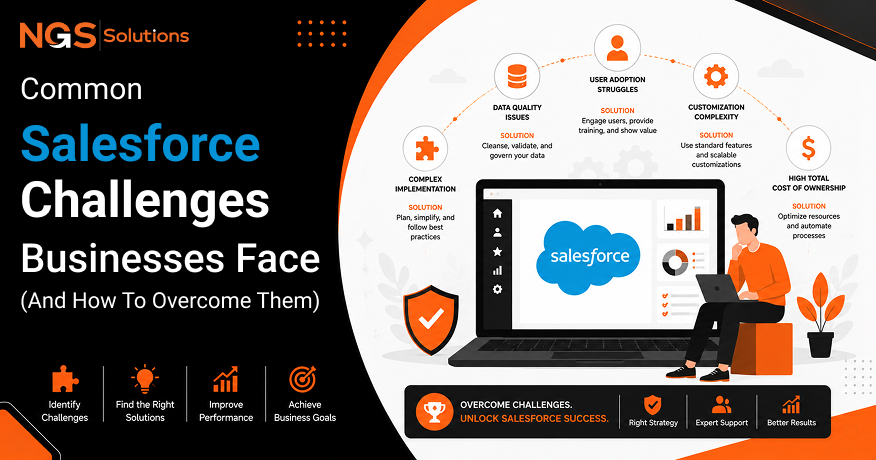
Salesforce is one of the most widely used CRM platforms because it helps businesses manage customer relationships, sales processes, service operations, and business data from a centralized system. However, having advanced technology alone does not guarantee success. Many organizations face Salesforce challenges because they focus on software capabilities while overlooking the importance of planning, data quality, user adoption, and process improvement.
According to Nucleus Research, organizations achieve an average return of $8.71 for every dollar invested in CRM technology, highlighting the strong potential value of CRM solutions when they are implemented effectively. However, businesses must have a clear strategy, trained users, and well-defined processes to achieve these results.
From implementation issues and data migration problems to customization and integration challenges, companies often struggle when they lack proper preparation. This blog explores the most common Salesforce obstacles and provides practical solutions to improve adoption, maintain data quality, and build a successful long-term CRM strategy.
Why Salesforce Projects Face Challenges
Implementing Salesforce requires more than installing software and adding users. Businesses must connect technology with their goals, workflows, and customer strategies. Without proper preparation, even advanced CRM tools may fail to deliver expected results.
Technology Alone Doesn’t Solve Business Problems
One of the biggest reasons companies experience Salesforce CRM problems is expecting technology to solve every business issue automatically. A CRM can organize information and automate tasks, but it cannot replace good planning or effective management.
For example, a company with unclear sales steps may still struggle after moving those processes into Salesforce. The system may store information, but employees may not know how to use it effectively.
Successful CRM adoption requires businesses to review existing workflows before making changes. Teams should identify what works, what creates delays, and which tasks can benefit from automation.
Technology creates value when it supports well-designed business processes. Without that foundation, companies may spend more time fixing system issues instead of improving customer relationships.
Poor Planning Before Implementation
Strong planning reduces many Common Salesforce implementation challenges. Businesses often rush into implementation because they want quick results, but poor preparation can create expensive problems later.
Before starting, companies should define project goals, identify key users, document current processes, and create a realistic timeline. They should also decide which Salesforce modules are necessary instead of adding features that employees may never use.
A detailed implementation plan should include:
- Clear project goals and success measurements.
- Employee roles and responsibilities.
- Data preparation steps.
- Training schedules.
- Long-term support plans.
Planning also helps companies avoid unnecessary changes during development. A structured approach creates smoother implementation and reduces disruption for employees.
Lack of Clear Business Objectives
Many Salesforce challenges begin when companies cannot explain what they want to achieve. A CRM project should solve specific problems, such as improving lead management, increasing sales visibility, or creating better customer service.
Without measurable goals, teams may struggle to determine whether the system is successful. They may collect unnecessary information, create complicated workflows, or build reports that do not support decision-making.
Clear objectives guide every part of the project, including configuration, user training, and performance reviews. Companies that define success early are more likely to achieve lasting results.
Low User Adoption
User adoption is one of the most important factors in CRM success. A well-designed Salesforce system provides limited value if employees avoid using it or enter incomplete information.
Why Employees Resist New CRM Systems
Employees may resist new CRM systems because they feel comfortable with existing tools and routines. Changes in daily work can create uncertainty, especially when users do not understand the benefits.
Some employees see CRM systems as extra administrative work rather than tools that make their jobs easier. This mindset can reduce Salesforce user adoption and affect data quality.
Strong change management helps reduce resistance. Leaders should explain why the system is being introduced and show how it can save time, improve communication, and support better results.
Poor User Experience
A complicated system can discourage employees from using it regularly. Too many fields, unclear layouts, and unnecessary steps create frustration.
Businesses should focus on creating a simple experience that matches employee needs. Users should see relevant information without searching through complicated screens.
Good design improves user onboarding and encourages employees to make Salesforce part of their daily routine.
Insufficient Training
Training problems are another major cause of low adoption. Employees need more than a basic introduction. They need practical guidance that matches their actual responsibilities.
Effective Salesforce user training tips include:
- Teach users with real business examples.
- Provide short, regular learning sessions.
- Create simple guides for common tasks.
- Offer support after launch.
Training should continue after implementation because business needs and system features change over time.
How to Improve User Adoption
Businesses can improve adoption by involving employees early, collecting feedback, and improving the system based on real usage. Users are more likely to support a CRM when they feel their needs are considered.
Regular communication, clear training, and ongoing improvements create stronger engagement. The goal is not only to get employees to use Salesforce but also to help them see its value in their daily work.
Data Migration Problems

Moving existing customer information into Salesforce is one of the most important stages of a CRM project. Poor migration planning can create serious Salesforce data migration challenges that affect reporting, customer service, and daily operations.
Data migration is not only about moving files from one system to another. Businesses must review, clean, organize, and validate information before importing it. Without proper preparation, inaccurate records can continue causing problems long after implementation.
Incomplete Customer Records
Incomplete customer records reduce the value of a CRM system. Missing phone numbers, outdated addresses, incorrect company details, or empty fields can make it difficult for teams to communicate effectively.
Before migration, companies should review existing databases and identify missing information. They should decide which data is necessary and remove records that no longer provide business value.
Strong customer data management practices help businesses create reliable customer profiles. Clean records improve sales activities, service quality, and reporting accuracy.
Duplicate Data
Duplicate records are a common problem during CRM migration. A single customer may appear multiple times because different departments store information separately.
Duplicate data can create confusion for sales teams and produce inaccurate reports. Employees may contact the same customer multiple times or miss important details because information is divided between records.
Businesses should use data cleaning tools and matching rules before importing information. Removing duplicates improves data quality and creates a more trustworthy CRM environment.
Inconsistent Data Formats
Different systems often store information in different formats. One database may use full country names, while another uses abbreviations. Dates, phone numbers, and customer categories may also follow different structures.
These differences can create errors during migration. Standardizing information before import helps Salesforce store data correctly and improves future reporting.
A clear data format strategy should define:
| Data Area | Recommended Practice |
| Customer names | Use consistent spelling rules |
| Phone numbers | Follow one format |
| Dates | Use standard date formats |
| Categories | Create approved values |
Data Validation Best Practices
Data validation protects the CRM from inaccurate information. Businesses should test migrated records before allowing employees to use the system.
Good Salesforce data migration best practices include reviewing sample records, checking required fields, testing integrations, and confirming that reports show correct information.
Companies should also create rules that prevent poor data from entering Salesforce in the future. Regular reviews help maintain accuracy as the database grows.
Over-Customization
Salesforce offers many options for adjusting the platform to business needs. However, excessive customization can create long-term problems. Many organizations experience Salesforce customization issues because they change too many standard features without considering future maintenance.
When Too Much Customization Becomes a Problem
Customization is useful when it improves business processes, but unnecessary changes can make the system difficult to manage. Adding too many custom fields, workflows, and applications may confuse users and increase training needs.
A common mistake is customizing Salesforce to match outdated processes instead of improving those processes first. Companies should simplify workflows before building complex solutions.
Understanding Salesforce customization mistakes helps businesses create a system that remains flexible and easy to maintain.
Maintenance Challenges
Every customization requires ongoing support. When Salesforce updates its platform, custom features may need testing to ensure they continue working correctly.
Large numbers of custom components can increase administrative work. Teams may spend more time maintaining the system than improving business operations.
A balanced approach allows businesses to gain flexibility without creating unnecessary complexity.
Performance Issues
Too much customization can also affect system performance. Complex automation rules, large data volumes, and inefficient processes may slow down user experiences.
Performance problems can reduce employee confidence and lower adoption rates. Businesses should review custom features regularly and remove anything that no longer supports important goals.
Best Practices for Customizing Salesforce
Successful customization starts with a clear reason for every change. Companies should focus on solutions that improve productivity, customer service, or business visibility.
Recommended practices include:
- Use standard Salesforce features when possible.
- Document every customization.
- Test changes before releasing them.
- Review custom features regularly.
A strong CRM governance plan helps organizations control changes and maintain system scalability.
Integration Challenges
Modern businesses rely on many digital systems. Connecting Salesforce with other platforms can improve efficiency, but technical issues may create Salesforce integration challenges if systems are not planned carefully.
Connecting Salesforce with ERP Systems
ERP systems manage important business information such as finance, inventory, and operations. Connecting them with Salesforce creates a complete view of customers and business activities.
However, differences between systems can create challenges. Data structures, security rules, and update schedules must work together properly.
Careful planning helps companies avoid Salesforce CRM integration problems and ensures information moves accurately between platforms.
Email Integration Issues
Email integration allows teams to connect customer communication with CRM records. When configured correctly, it improves visibility and helps employees track conversations.
Problems may occur when email settings, permissions, or synchronization rules are not properly configured. Employees may lose confidence if messages do not appear correctly.
Testing email connections before launch helps prevent these issues.
Marketing Platform Integration
Marketing systems provide valuable customer behavior information. Connecting them with Salesforce helps sales teams understand leads and improves campaign tracking.
However, different platforms may use different data structures. Businesses should define which information needs to move between systems and how often updates should occur.
API Compatibility
APIs allow different applications to communicate. Compatibility issues may appear when systems use different standards or have limited connection options.
Businesses should review API requirements before integration projects begin. Good technical planning reduces errors, improves reliability, and supports future growth.
Poor Reporting and Dashboard Usage

Reports and dashboards help businesses understand performance, but many companies struggle to use these tools effectively. Poor planning, incorrect measurements, and unreliable information can create Salesforce reporting challenges that limit decision-making.
A CRM system can collect large amounts of data, but data only becomes useful when businesses know what information matters. Teams should focus on reports that support business goals instead of creating dashboards filled with unnecessary numbers.
Using the Wrong KPIs
Key performance indicators help companies measure progress. However, choosing the wrong KPIs can lead to poor decisions.
For example, tracking the number of sales calls may not provide useful information if the real goal is improving customer retention. Businesses should select measurements that connect directly with their objectives.
Effective KPIs may include:
- Sales conversion rates.
- Customer response times.
- Revenue growth.
- Lead quality.
- Customer satisfaction levels.
The right KPIs help managers understand performance and identify areas for improvement.
Data Accuracy Problems
Reports are only as reliable as the information behind them. Incorrect records, missing details, and outdated customer information can create misleading results.
Poor data practices often happen when employees do not understand why accurate updates matter. Strong training and clear processes encourage better information management.
Regular data reviews improve reporting accuracy and help leaders make decisions based on trustworthy insights.
Building Meaningful Dashboards
A useful dashboard should answer important business questions quickly. Too many charts and metrics can make information harder to understand.
Businesses should design dashboards based on user roles. Sales managers may need pipeline information, while service leaders may focus on response times and customer satisfaction.
Simple dashboards improve visibility and help teams take action faster.
Improving Decision-Making
Reports and dashboards should support action, not just display information. Managers should review trends, identify problems, and use insights to improve business processes.
When reporting becomes part of regular decision-making, Salesforce becomes a strategic tool instead of only a data storage system.
Security and Permission Management
Customer information requires strong protection. Managing access correctly is an important part of avoiding Salesforce CRM problems related to security and compliance.
Salesforce provides security tools that allow businesses to control who can view, edit, and share information. However, poor configuration can create unnecessary risks.
Role-Based Access
Role-based access controls what users can see based on their responsibilities. For example, sales representatives may access their own customer records, while managers may view team information.
Proper user permissions protect sensitive information and reduce accidental data exposure.
Businesses should review access levels regularly, especially when employees change roles or leave the organization.
Permission Sets
Permission sets provide flexible access without changing a user’s main role. They allow administrators to give specific abilities to selected employees when needed.
For example, a temporary project team may require additional access during implementation. Permission sets make this possible while keeping security controls in place.
Good permission management supports productivity without reducing data protection.
Data Privacy
Data privacy is becoming more important as companies collect more customer information. Businesses must handle customer data responsibly and follow relevant privacy requirements.
Security practices should include:
- Limiting unnecessary access.
- Protecting sensitive information.
- Monitoring unusual activity.
- Reviewing privacy policies.
Strong privacy controls build customer trust and support responsible digital transformation.
Audit and Compliance
Audit tools help organizations track changes and understand system activity. These records are useful for compliance reviews, security investigations, and internal monitoring.
Regular audits help businesses identify risks before they become serious problems. They also support better CRM governance by creating accountability for system usage.
Lack of Ongoing CRM Governance

Launching Salesforce is only the beginning. Long-term success requires continuous management, improvement, and review. Without proper governance, businesses may experience growing Salesforce challenges as processes become outdated.
Why Governance Matters
CRM governance defines how a company manages its Salesforce environment. It includes rules for customization, data quality, user access, reporting, and system changes.
Without governance, different teams may create conflicting processes or add unnecessary features. This can make the platform harder to manage.
A strong governance model keeps Salesforce organized and aligned with business goals.
Regular Data Audits
Customer information changes over time. People change jobs, companies update details, and business relationships evolve.
Regular data audits help identify outdated records, duplicates, and missing information. These reviews protect data quality and improve confidence in CRM reports.
A consistent audit schedule prevents small issues from becoming major database problems.
Continuous Process Improvement
Business needs change, and CRM processes must change with them. Companies should regularly review workflows, automation, and user experiences.
Process improvement helps businesses remove unnecessary steps and improve efficiency. It also ensures Salesforce continues supporting current goals instead of outdated practices.
User Feedback Loops
Employees who use Salesforce every day often understand problems better than anyone else. Creating feedback channels helps businesses discover issues and improve the system.
User feedback can reveal training needs, workflow problems, and opportunities for optimization.
Listening to users creates stronger engagement and supports long-term CRM success.
Best Practices for Long-Term Salesforce Success
Long-term success requires more than solving immediate problems. Businesses need a clear strategy that supports growth, employee engagement, and continuous improvement.
Define Clear Business Goals
Clear goals provide direction for every Salesforce decision. Companies should know what they want to improve, how success will be measured, and which teams will benefit.
Goals help prevent unnecessary features and keep projects focused on business value.
Invest in User Training
Training should continue after implementation. New employees need onboarding support, and existing users need updates when processes change.
Strong training improves confidence and helps employees use Salesforce more effectively.
Maintain Data Quality
Clean data supports accurate reports, better customer service, and stronger decision-making. Companies should create rules for data entry and perform regular reviews.
Good data practices protect the value of the entire CRM system.
Review Workflows Regularly
Workflows should support current business needs. Regular reviews help companies remove outdated automation and improve efficiency.
Optimized workflows reduce manual tasks and create smoother operations.
Measure CRM Performance
Performance reviews show whether Salesforce is meeting business goals. Companies should track adoption rates, productivity improvements, customer results, and system effectiveness.
Regular measurement helps organizations continue improving their CRM strategy over time.
Conclusion
The most common Salesforce challenges are rarely caused by the platform itself. Problems usually come from weak planning, poor data practices, limited training, unclear goals, and lack of ongoing management.
Successful Salesforce adoption depends on a clear business strategy, accurate customer information, strong user adoption, effective governance, and continuous optimization. Companies that treat Salesforce as an evolving business system can improve productivity, strengthen customer relationships, and support long-term growth.
Technology provides the foundation, but people, processes, and smart decisions determine CRM success.
FAQs
-
Why do Salesforce implementations fail?
Salesforce implementations often fail because businesses do not define clear goals, prepare their data, train users properly, or manage changes effectively.
-
What is the biggest challenge when using Salesforce?
The biggest challenge is often user adoption. A CRM system only creates value when employees use it correctly and consistently.
-
How can businesses improve Salesforce user adoption?
Businesses can improve adoption through clear communication, practical training, simple workflows, user feedback, and ongoing support.
-
What causes Salesforce data migration issues?
Migration issues usually come from incomplete records, duplicate data, inconsistent formats, and poor validation before importing information.
-
How often should Salesforce data be cleaned?
Data should be reviewed regularly. Many businesses perform audits monthly, quarterly, or based on their data volume and business needs.
-
How can businesses avoid over-customizing Salesforce?
Companies can avoid over-customization by using standard features when possible, planning changes carefully, documenting custom work, and reviewing custom features regularly.


