
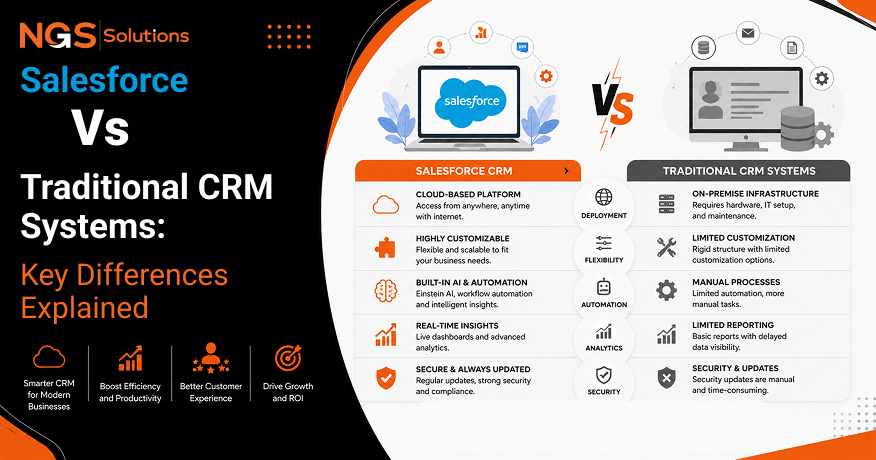
Every customer interaction generates valuable data, but the real advantage comes from how effectively a business uses it. As competition grows and customer expectations continue to rise, selecting the right CRM platform has become a strategic decision rather than simply an IT investment. This is why the comparison between Salesforce and traditional CRM remains highly relevant for organizations of all sizes.
Traditional CRM systems were built for an era of on-premises infrastructure, while Salesforce introduced a cloud-first approach focused on flexibility, automation, and continuous innovation. Many organizations also rely on Salesforce consulting services to simplify implementation, optimize business processes, and maximize the value of their CRM investment.
This guide examines the key differences between Salesforce and traditional CRM, covering deployment, scalability, automation, reporting, integrations, security, and long-term business value. Whether you are upgrading an existing system or planning future growth, understanding these differences will help you make a more informed technology decision.
What Is a Traditional CRM?

Definition
A traditional CRM is a customer management system that is usually installed on a company’s own servers. It stores customer details, sales records, and communication history in a controlled internal environment. Many older systems are known as legacy CRM solutions because they were designed before cloud computing became common.
These platforms helped businesses organize customer relationships and replace manual spreadsheets. They provided valuable tools for sales tracking, contact management, and reporting. However, many older solutions require more technical support and planning.
How Traditional CRM Systems Work
Traditional CRM systems work through software installed within a company’s IT environment. Employees usually access the system through office computers connected to internal networks. Updates, maintenance, and security tasks are often managed by internal teams.
Companies purchase licenses, install the software, and customize the system according to their needs. This process can take time and may require specialized technical skills. The company controls the hardware, database, and software environment.
Common Characteristics

Traditional systems often include basic CRM functions, but they may have limits when businesses expand. Common features include contact records, sales tracking, and customer notes.
Typical characteristics include:
- Installation on local servers
- Internal IT management
- Limited remote access
- Manual updates
- Higher hardware responsibilities
For many years, these solutions were effective. However, changing customer demands have increased the need for faster and more connected tools.
What Makes Salesforce Different?
Cloud-Based Architecture
Salesforce uses a cloud-based architecture that allows companies to access CRM tools through the internet. Unlike older systems, businesses do not need to maintain large server environments. The Salesforce cloud platform provides a flexible foundation for companies of different sizes.
The Salesforce vs traditional CRM comparison often highlights this difference because cloud technology changes how businesses manage resources. Companies can focus more on customers and less on infrastructure management.
Continuous Updates
Modern CRM systems benefit from regular software improvements. Cloud providers manage updates automatically, which reduces the burden on internal teams. Businesses can receive new features, security improvements, and performance changes without major installation projects.
Traditional systems may require scheduled upgrades that involve planning, testing, and downtime. This difference can affect productivity and operational speed.
Anywhere Access
Remote work has increased the need for easy data access. Cloud CRM platforms allow employees to view customer information from different locations and devices. Mobile CRM tools help sales teams work while traveling, meeting customers, or working from home.
This level of accessibility improves communication and allows teams to respond quickly.
Built for Growth
Salesforce was designed to support organizations as they grow. Companies can add users, features, and integrations as their needs change. This scalability makes it suitable for businesses with changing goals.
The Salesforce advantages over traditional CRM include faster expansion, easier customization, and support for complex business processes.
Deployment Comparison
On-Premise Installation
On-premise software requires companies to install and manage applications on their own equipment. This approach gives businesses direct control over their systems. However, it also creates more responsibilities.
Companies must handle hardware costs, maintenance, security updates, and technical problems. These requirements can become challenging as organizations expand.
Cloud Deployment
Cloud deployment allows businesses to use software hosted by a provider. This approach reduces the need for physical infrastructure. The provider manages many technical tasks, including system availability and updates.
A Cloud CRM vs on-premise CRM review shows that cloud options often provide faster setup and easier access.
| Feature | Traditional CRM | Cloud CRM |
| Hosting | Company servers | Provider-managed cloud |
| Updates | Manual process | Regular automatic updates |
| Access | Limited locations | Internet-based access |
| Maintenance | Internal responsibility | Mostly managed by provider |
Maintenance Requirements
Maintenance is a major difference between older and newer systems. Traditional platforms often need dedicated teams for troubleshooting and upgrades. Cloud solutions reduce many of these tasks.
Lower maintenance needs allow employees to spend more time improving customer relationships.
IT Resource Needs
Traditional CRM environments usually require more IT involvement. Teams may need experts for servers, databases, and system changes. Cloud solutions typically reduce these demands.
This does not remove the need for IT support, but it changes the focus from maintenance to improvement.
Scalability Comparison
Growing Teams
Businesses rarely remain the same size for long. As organizations hire more employees, expand their sales operations, and serve a growing customer base, their CRM system must scale without compromising speed or performance. Scalability is one of the most critical considerations in any CRM software comparison because it determines whether the platform can support future business growth without requiring expensive upgrades or complete replacement.
A scalable CRM enables organizations to accommodate additional users, larger databases, and increasing customer interactions while maintaining consistent performance. Modern cloud CRM platforms automatically allocate computing resources as demand increases, allowing businesses to expand with minimal disruption. This flexibility ensures that organizations can continue growing without worrying about infrastructure limitations or declining system efficiency.
Business Expansion
Business growth often involves entering new geographic markets, launching additional product lines, or serving new customer segments. These changes require a CRM platform that can adapt quickly without extensive redevelopment or system migration. A flexible CRM supports expansion by allowing organizations to create customized sales processes, manage multiple business units, and maintain separate customer records while operating within a unified platform.
Companies expanding internationally also benefit from features such as multi-currency support, multilingual interfaces, localized workflows, and region-specific reporting. Rather than replacing existing systems every few years, businesses can continue extending modern CRM platforms as their operations become increasingly complex.
Adding New Features
Technology requirements evolve as organizations mature. A business may initially require only contact management and sales tracking, but over time, it may need advanced marketing automation, customer service management, artificial intelligence, analytics, or partner relationship management. Modern cloud CRM platforms are designed with modular architectures that allow businesses to activate new capabilities whenever they become necessary.
This flexibility reduces implementation costs while allowing organizations to adopt new technologies gradually instead of investing in large-scale system replacements. As customer expectations continue to evolve, businesses can introduce automation, reporting tools, mobile applications, and customer self-service portals without disrupting existing operations.
Supporting Multiple Locations
Organizations operating across different cities, regions, or countries require centralized access to customer information. Cloud CRM platforms provide a shared database where employees from every location work with the same real-time customer records. This eliminates duplicate information, improves collaboration between departments, and ensures that every team member has access to the latest customer interactions.
The ability to securely access CRM data from any location also supports remote work and hybrid workplaces. Sales representatives, customer service agents, and managers can update records and monitor customer relationships regardless of their physical location, creating a more connected and efficient organization.
Automation Capabilities

Workflow Automation
Workflow automation is one of the greatest advantages offered by modern CRM platforms. Manual administrative tasks consume valuable employee time and increase the likelihood of human error. Automation removes repetitive processes by allowing the CRM to perform routine activities based on predefined business rules.
For example, new customer inquiries can automatically be assigned to the appropriate salesperson, follow-up reminders can be generated after meetings, customer records can be updated automatically after interactions, and notifications can be sent whenever important milestones are reached. These automated workflows improve consistency while allowing employees to focus on higher-value activities such as customer engagement and strategic planning.
Task Automation

Sales professionals often manage dozens of customer interactions each day, making it difficult to remember every follow-up, appointment, or communication. Task automation helps ensure that important activities are never overlooked by automatically scheduling reminders, creating follow-up tasks, recording customer interactions, and updating sales opportunities.
Automated task management improves productivity by reducing administrative work and ensuring that every customer receives timely communication. Consistent follow-up also strengthens customer relationships and increases the likelihood of successful sales outcomes.
Approval Processes

Many organizations require managerial approval before discounts are offered, contracts are finalized, refunds are processed, or special requests are approved. Modern CRM systems automate these approval workflows by routing requests to the appropriate decision-makers while recording every stage of the approval process.
Automated approval systems improve transparency, reduce delays, and create detailed audit trails that help organizations maintain operational consistency and regulatory compliance. Employees no longer need to manually track approvals through emails or spreadsheets, significantly reducing processing time.
AI-Powered Productivity

Artificial intelligence has become an increasingly important component of modern CRM platforms. Rather than replacing employees, AI enhances productivity by analyzing customer data, identifying meaningful patterns, and providing recommendations that support better decision-making.
AI-powered CRM systems can predict which leads are most likely to convert, identify customers at risk of leaving, recommend the next best sales action, summarize customer meetings, generate personalized communications, and forecast future sales performance. These intelligent capabilities help businesses improve efficiency while delivering more personalized customer experiences.
Reporting and Analytics

Traditional Reporting

Traditional CRM systems often rely on static reports that require manual generation and technical expertise to customize. As business requirements change, creating new reports may involve database queries or assistance from IT specialists, slowing the decision-making process.
Because these reports are typically generated at scheduled intervals, managers may be working with outdated information that does not accurately reflect current business conditions. This limitation can reduce organizational responsiveness in competitive markets.
Real-Time Dashboards

Cloud CRM platforms replace static reports with dynamic dashboards that update continuously as customer interactions occur. Managers gain immediate visibility into sales performance, customer engagement, marketing activities, service requests, and employee productivity without waiting for manually prepared reports.
Real-time dashboards support faster decision-making by presenting key performance indicators through interactive charts, graphs, and visual summaries. Executives can quickly identify emerging opportunities, monitor team performance, and respond to changing business conditions using current information rather than historical snapshots.
Business Intelligence

Business intelligence extends CRM reporting by transforming customer data into meaningful insights that support strategic planning. Advanced analytics examine purchasing behavior, customer preferences, sales trends, regional performance, and customer lifetime value to help organizations better understand their markets.
These insights allow businesses to improve marketing strategies, optimize sales activities, identify profitable customer segments, and allocate resources more effectively. As organizations accumulate larger volumes of customer data, business intelligence becomes increasingly valuable for maintaining a competitive advantage.
Forecasting

Forecasting enables organizations to prepare for future opportunities by analyzing historical performance alongside current sales activities. Modern CRM platforms use predictive analytics and artificial intelligence to estimate future revenue, identify sales trends, and evaluate the likelihood of successful opportunities.
Accurate forecasting supports budgeting, hiring decisions, inventory planning, production scheduling, and long-term strategic planning. By using continuously updated customer data, cloud CRM systems provide more reliable forecasts than traditional manual estimation methods.
Integration Ecosystem
Third-Party Applications
CRM software rarely functions as an isolated business application. Organizations typically rely on accounting systems, collaboration platforms, marketing software, project management tools, customer support applications, and communication services to manage daily operations. Modern CRM platforms are designed to integrate with these external systems, creating a connected digital ecosystem where information flows automatically between applications.
This integration reduces duplicate data entry, improves operational efficiency, and ensures that employees always work with consistent and accurate customer information across the organization.
Marketing Platforms
Integrating CRM software with marketing platforms allows businesses to create more personalized and data-driven marketing campaigns. Marketing teams can monitor customer behavior, evaluate campaign performance, nurture leads based on engagement, and measure return on investment using unified customer data.
The close alignment between sales and marketing departments improves lead quality, enhances customer experiences, and supports more effective communication throughout the customer journey.
ERP Integration
Enterprise Resource Planning systems manage essential business functions such as finance, procurement, manufacturing, inventory, and supply chain operations. Integrating CRM with ERP creates a comprehensive view of both customer relationships and internal business activities.
Sales representatives gain access to inventory availability, financial information, and order status while finance teams receive updated customer transaction data. This integration improves collaboration across departments and enables more informed business decisions.
API Connectivity
Application Programming Interfaces (APIs) provide the foundation for modern software integration by allowing different systems to exchange information securely and efficiently. Strong API support enables organizations to connect existing business applications, develop custom solutions, and automate complex workflows without extensive redevelopment.
Open APIs also provide greater flexibility for future technology investments, allowing businesses to adopt new software while maintaining a connected and scalable technology environment.
Security and Compliance
Cloud Security
Protecting customer information has become a strategic priority for businesses of every size. Cloud CRM providers invest heavily in cybersecurity technologies, continuous monitoring, encryption, identity management, and threat detection to safeguard sensitive business data.
Unlike many traditional on-premises systems, cloud platforms receive regular security updates and vulnerability patches automatically, reducing the burden on internal IT teams while maintaining a strong security posture against emerging cyber threats.
Data Backups
Customer data represents one of an organization’s most valuable business assets. Hardware failures, cyberattacks, accidental deletion, or natural disasters can result in significant operational disruption if information is not adequately protected.
Cloud CRM platforms typically include automated backup systems, geographically distributed data centers, disaster recovery planning, and rapid restoration capabilities. These measures ensure that organizations can recover important customer information quickly while minimizing business interruption.
Access Control
Effective CRM security depends on ensuring that employees access only the information required for their responsibilities. Modern CRM platforms provide sophisticated permission management that allows administrators to control visibility based on departments, job roles, geographic regions, or individual responsibilities.
Comprehensive access controls protect confidential customer information while maintaining accountability through detailed activity logs and audit trails that record every significant user action.
Compliance Standards
Many industries operate under strict regulations governing the collection, storage, and processing of customer information. Modern CRM platforms assist organizations in meeting compliance requirements by providing encryption, consent management, audit logging, data retention policies, and privacy controls.
As global data privacy regulations continue to evolve, cloud CRM providers regularly update their platforms to support changing legal requirements, helping organizations reduce compliance risks while maintaining customer trust.
Which Businesses Benefit Most from Cloud CRM?
Cloud CRM solutions provide advantages for organizations of every size, although the specific benefits vary according to business maturity and operational complexity. Startups benefit from low implementation costs and rapid deployment without significant investments in hardware or IT infrastructure. Small businesses gain access to enterprise-level capabilities while simplifying system administration and reducing maintenance responsibilities.
Mid-sized companies benefit from automation, advanced reporting, and improved collaboration as they expand their operations and customer base. Large enterprises require highly scalable platforms capable of supporting global operations, complex organizational structures, advanced security requirements, and millions of customer records. Modern cloud CRM systems provide the flexibility needed to support these diverse business environments while adapting to future organizational growth.
The question of which CRM is best for a growing business ultimately depends on business objectives, available resources, industry requirements, and long-term technology strategy. No single solution is ideal for every organization, making careful evaluation essential.
Choosing the Right CRM Strategy
Business Goals
Selecting a CRM should begin with a clear understanding of organizational objectives. Businesses should identify whether their primary focus is improving customer service, increasing sales performance, strengthening marketing effectiveness, enhancing customer retention, or supporting digital transformation initiatives. A CRM strategy aligned with business goals delivers greater long-term value than simply adopting the latest technology.
Growth Plans
Technology investments should support future expansion rather than only addressing current operational needs. Organizations should evaluate whether a CRM can accommodate additional employees, larger customer databases, international expansion, multiple business units, and evolving customer expectations without requiring major infrastructure changes.
Choosing a scalable platform from the outset reduces future migration costs while ensuring continuity as the business grows.
Internal Resources
Every CRM implementation requires user training, ongoing administration, and technical support. Organizations should realistically assess their internal capabilities before selecting a platform. Businesses with limited IT resources often benefit from cloud-based solutions that minimize infrastructure management while providing automatic software updates and vendor-supported maintenance.
Future Requirements
CRM investments often remain in place for many years, making long-term planning essential. Organizations should consider emerging technologies such as artificial intelligence, predictive analytics, workflow automation, omnichannel communication, mobile accessibility, and advanced integration capabilities when evaluating potential solutions.
A carefully planned CRM strategy minimizes future technology disruptions, supports sustainable business growth, and improves long-term return on investment. The differences between Salesforce and legacy CRM systems clearly demonstrate why scalability, flexibility, automation, and cloud innovation have become defining factors in modern CRM selection.
Conclusion
Choosing between Salesforce vs traditional CRM depends on your business goals, budget, and long-term plans. A balanced Salesforce comparison shows that both options can support customer relationship management, but they differ in how they handle growth, maintenance, and day-to-day operations. While many organizations still rely on traditional systems for greater infrastructure control, it’s also important to recognize the Traditional CRM limitations, especially as business needs become more dynamic.
When evaluating Salesforce vs traditional CRM software, factors such as CRM deployment, Data accessibility, and Software updates often play a major role in the final decision. Cloud-based platforms simplify system management, provide secure access from almost anywhere, and receive regular improvements without complex upgrade projects. These are some of the key Benefits of cloud CRM, particularly for businesses focused on flexibility, scalability, automation, and long-term growth.
Rather than choosing a solution based on current needs alone, businesses should consider future expansion, available IT resources, and evolving customer expectations. Selecting the right CRM strategy today can improve productivity, support digital transformation, and help build stronger customer relationships over time.
FAQs
-
What is the difference between Salesforce and traditional CRM?
The biggest difference is how the platforms are built and managed. Salesforce is a cloud-based solution, while many traditional CRM systems run on local servers. In a typical Salesforce comparison, cloud platforms stand out for easier management, better Data accessibility, automatic Software updates, and greater scalability.
-
Is cloud CRM better than on-premise CRM?
It depends on business requirements. A cloud CRM is often the better option for companies that need remote access, faster CRM deployment, and lower maintenance. Organizations with strict infrastructure policies or specialized compliance requirements may still prefer on-premise solutions.
-
Why are businesses moving to cloud CRM?
Many organizations are adopting cloud CRM because it improves collaboration, simplifies maintenance, supports automation, and provides secure access from multiple locations. These practical Benefits of cloud CRM help businesses respond more quickly to changing customer needs.
-
Can traditional CRM systems still be useful?
Yes. Traditional CRM systems remain valuable for some organizations, particularly those with established IT infrastructure and stable business processes. However, companies should also consider the Traditional CRM limitations, including more complex maintenance, manual upgrades, and reduced flexibility as they grow.
-
Is Salesforce easier to scale than legacy CRM software?
In many cases, yes. Compared with many legacy platforms, Salesforce allows businesses to add users, features, and integrations with less effort, making it a practical choice for organizations planning future expansion.
-
Which industries benefit most from cloud CRM?
Industries such as retail, healthcare, financial services, manufacturing, technology, and professional services benefit from cloud CRM because they depend on fast customer interactions, connected data, and efficient workflows across multiple teams and locations.


